 Oriel
Version 0.97.1 beta out now
Oriel for programme evaluation
From published frameworks to judgements you can defend.
Bring published behavioural and implementation frameworks into your evaluation. Code with the TDF, COM-B, CFIR, and more, rate each site, compare groups, and keep dated records of how a programme was delivered and adapted.
These tools work alongside rapid analysis and realist tools in the same project. Oriel is free for Windows and Mac.
Who it’s for
For evaluations of real programmes.
Choose intervention or programme evaluation when you create a project, then pick the areas of enquiry that fit: process, implementation, behavioural, or realist, in any combination.
Process evaluations
Look at implementation, mechanisms of impact, and context, with the MRC process evaluation guidance as a reference for your methods section.
Implementation studies
Code with CFIR, ERIC, EPIS, NPT, or RE-AIM, rate each site, and compare sites that implemented well with those that struggled.
Behavioural diagnosis and design
Code with the TDF and COM-B, judge which domains matter, and explore intervention options through the Behaviour Change Wheel.
Realist process evaluation
Add realist tools to the same project, so CMOCs and framework terms link to the same evidence. See the realist page.
Your route
Five steps, with guidance for each.
Your home page sets out five steps from framing your evaluation to reporting it, with guidance for each area of enquiry you chose.
- 1Frame
- 2Organise
- 3Analyse
- 4Interpret
- 5Report
Guidance for each kind of evaluation
Each area of enquiry you choose adds guidance on framing and interpreting that kind of evaluation, with a reference for your methods section, such as the MRC process evaluation guidance, the CFIR user guide, the Behaviour Change Wheel, or RAMESES II.
Optional supporting work
Your home page lists a suggested workflow, such as Assess confidence in findings (CERQual), Check and refine programme theories, or Compare sites or groups. These are options rather than a checklist.
Your brief and research questions
Keep your purpose, a short summary, and your research questions together in the project brief. You can link each question to the sources, codes, analyses, models, and findings that answer it, and retire or reorder questions as your work develops.
Focus on one question
Choose a research question, or narrow the scope to particular sources, cases, studies, or attribute values, and the counts follow your choice. Reset scope takes you back to the whole project.
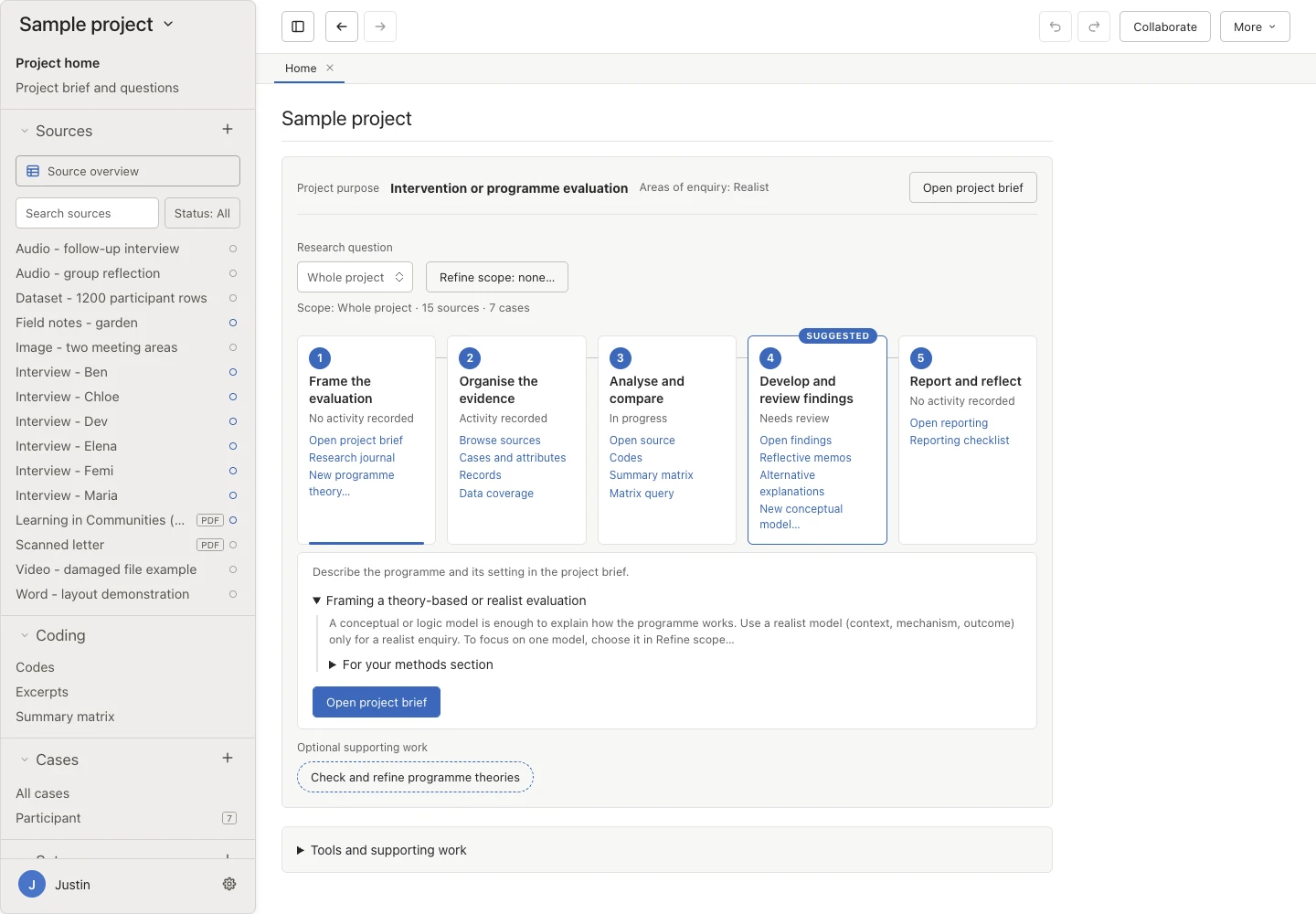
Evaluation route Work through an evaluation on your home page. 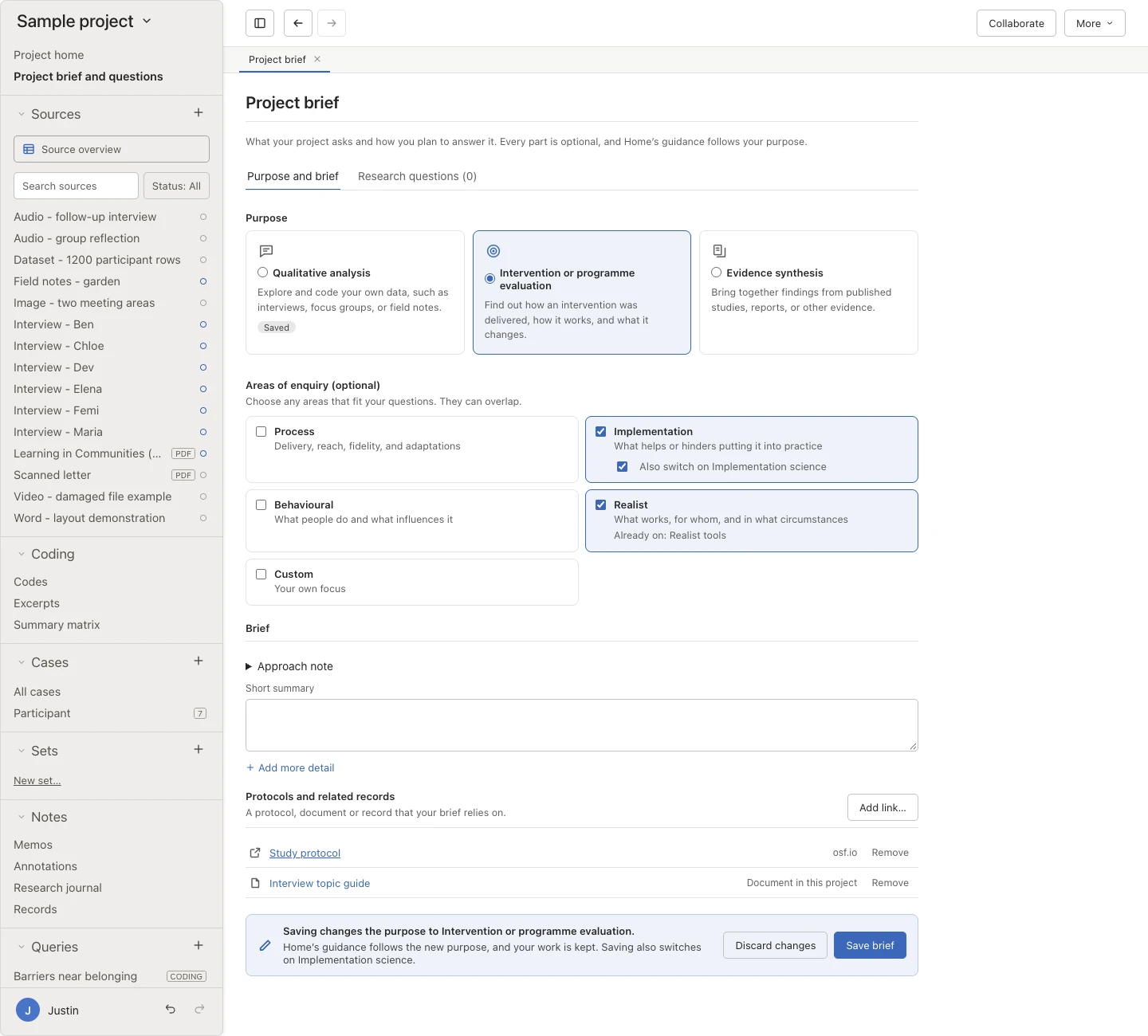
Project brief Keep your purpose, summary, and questions together.
Rapid analysis
Summaries and matrices when time is short.
Many evaluations need findings quickly. Summarise each source under your own headings, with or without line-by-line coding.
Summarise sources rapidly New
Summarise each source under headings you set in a template, such as what helped, what got in the way, and suggested changes, and keep the supporting quotations alongside. You can compare summaries side by side in a summary matrix, show one reviewer’s summaries or the agreed values, and develop a finding from any summary. This works with or without line-by-line coding.
Write a framework matrix
Build a case-by-code matrix of your own written summaries, with the supporting evidence close at hand.
Cases, classifications, and sets
Represent participants, organisations, or settings as cases, give them typed attributes in an editable sheet, and group items into reusable sets.
See where your data are New
Data coverage shows how your material and analysis spread across groups you define with attributes and time points. Empty combinations and missing values stay visible, so you can see the gaps.
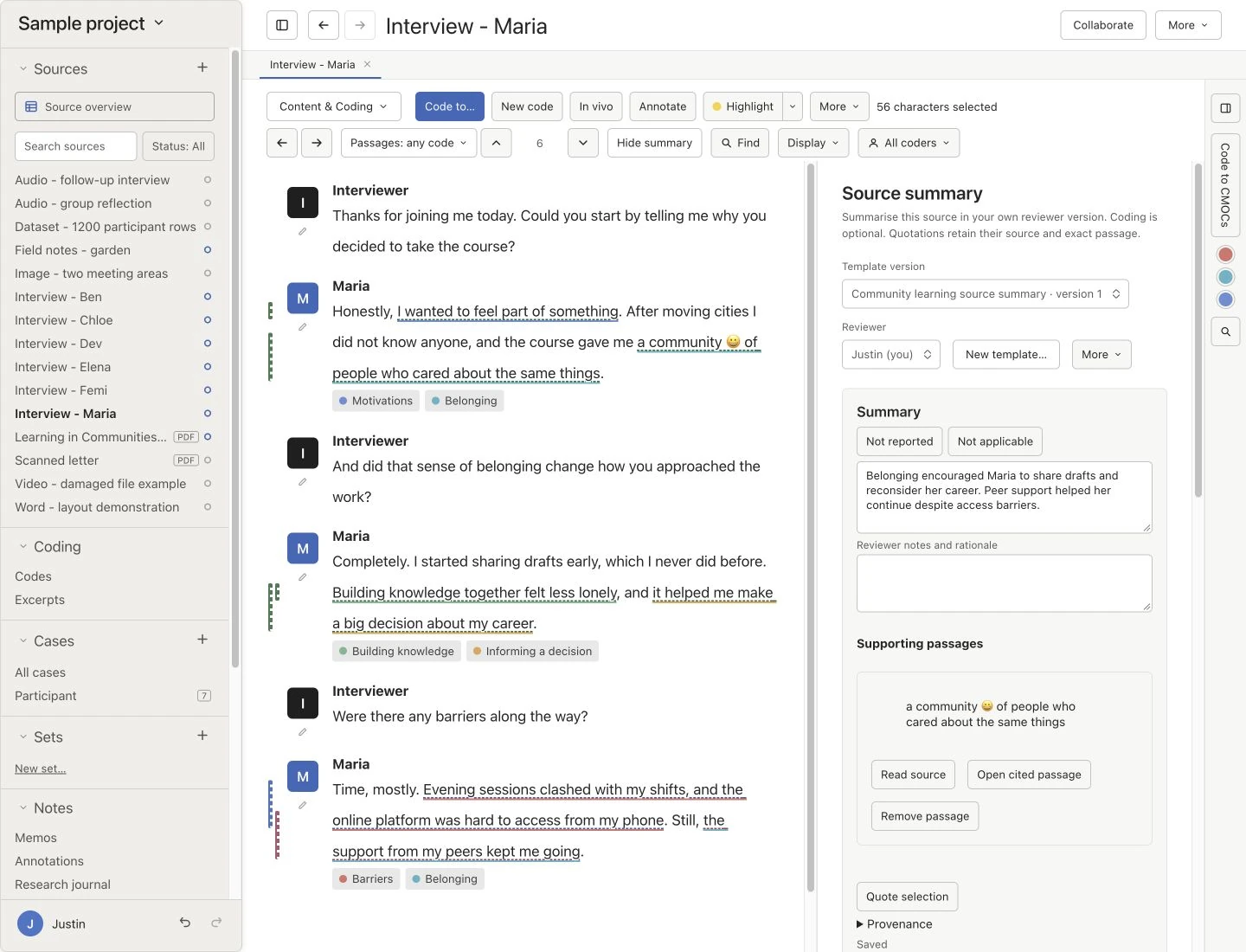
Source summary Summarise a source under your headings beside its text. 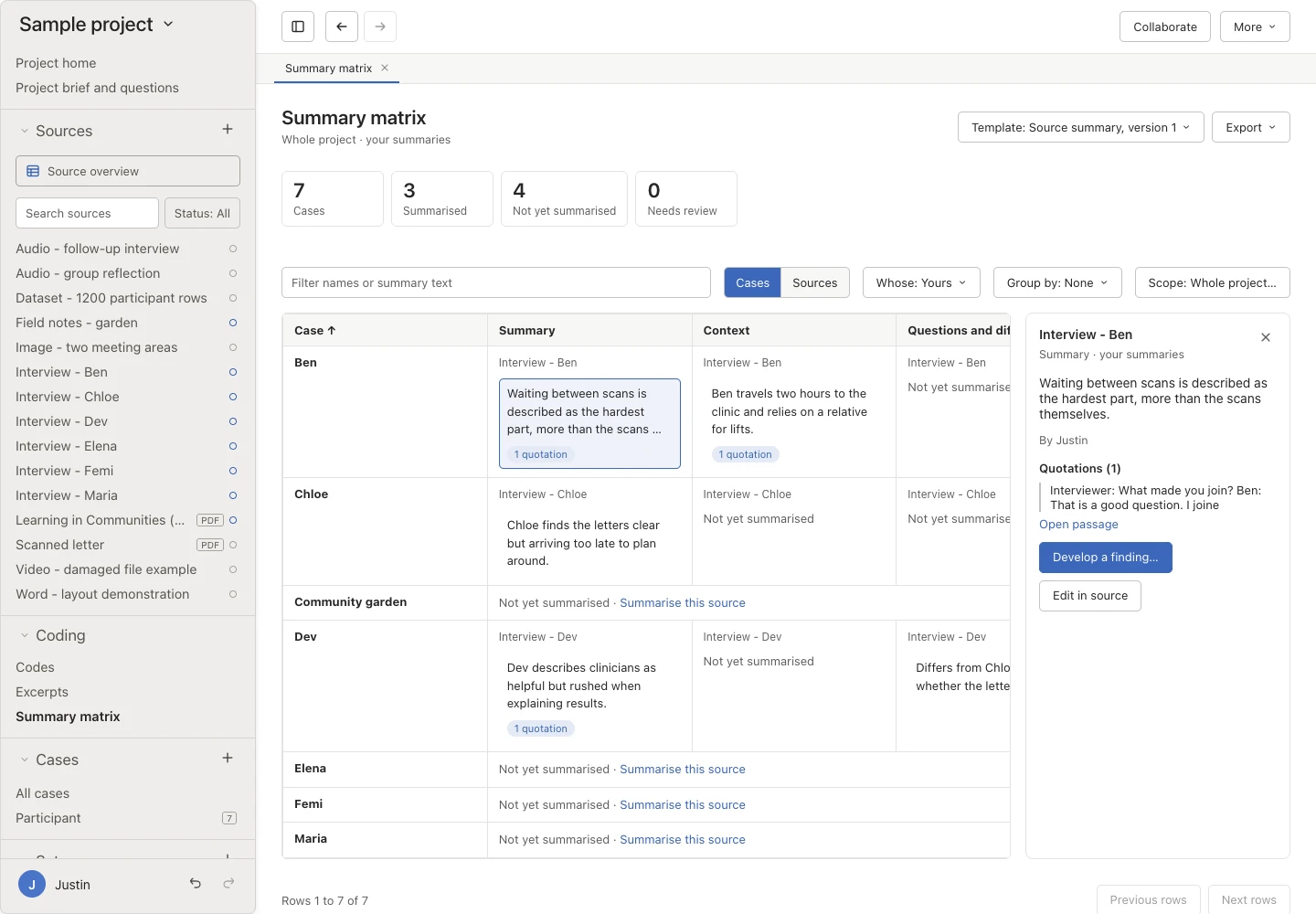
Summary matrix Compare summaries and develop findings.
These tools are part of every Oriel project. The features page covers queries and matrices in full.
Behavioural science
From what people say to what might change behaviour.
Code against the Theoretical Domains Framework, COM-B, and the Behaviour Change Wheel, run a behavioural diagnosis, and describe your codes and CMOCs with standard behaviour change terms.
Add a whole framework’s codes, with their published definitions, in one undoable step. Click any count to read the passages behind it.
- 1Add a framework
- 2Code your data
- 3Create a behavioural diagnosis
- 4Judge relevance
- 5Explore intervention design
Switch it on in any project
Choose behavioural questions as part of an evaluation, or turn on Behavioural science when you create a project or later in Settings → Methods. It works with or without realist tools, evidence synthesis, and implementation science.
Add a framework’s codes
Add the 14 domains of the Theoretical Domains Framework (v2) with their 84 constructs, COM-B components, Behaviour Change Wheel intervention functions or policy categories, or the Behaviour Change Technique Ontology, each with its published definition.
Sort passages into barriers and enablers
Optional Barrier and Enabler codes under each domain or component let you code whether something hinders or helps the behaviour, and count both the same way for any framework.
Run a behavioural diagnosis
See your coding counted for each TDF domain, grouped by COM-B, for the whole project or case by case. It shows references, sources, barriers, enablers, and a Mixed flag where both appear.
Judge relevance yourself
Read the passages, then judge each domain Relevant or Not relevant with a rationale, with the published criteria for judging beside you. A count isn’t treated as a judgement, and there’s no cut-off.
Explore intervention design
From each relevant domain, follow published links to COM-B components, intervention functions, policy categories, and the techniques the Theory and Techniques Tool links to its mechanism. Link the ones you choose to a code or CMOC.
Plan or adapt an intervention New
Open the planning route on a behaviour change logic model and work through seven steps. You specify the behaviour, review the diagnosis, draft pathways, check assumptions and evidence, choose components using BCTs, APEASE, and TIDieR, define the evaluation, and review the plan. You can close the route at any point.
Describe codes with standard terms
Link codes to techniques, modes of delivery, sources, mechanisms of action, settings, population characteristics, behaviours, TDF domains, and COM-B components, alongside your own names.
Find where a term is used
Click a term to see every code and CMOC linked to it, and the Theory and Techniques Tool’s published verdicts on which techniques act through which mechanisms.
Templates for interventions
In an evidence synthesis, start from Intervention description, BCT coding, or APEASE appraisal templates, and add Ontology terms fields to any template.
Optional AI term suggestions
Local AI can suggest terms for a code or CMOC, or find framework elements in a study. Each suggestion shows its reason, and nothing is linked until you accept it.
Export and report
Export a diagnosis and its judgements to CSV or Excel, export every linked term, and copy wording for your methods section with the ontology release you used.
| TDF domain | Coded | Judgement |
|---|---|---|
| KnowledgePsychological capability | 14 refs9 barriers · 2 enablers | |
| Social influencesSocial opportunity | 11 refs3 barriers · 7 enablers · Mixed | |
| Environmental context and resourcesPhysical opportunity | 6 refs5 barriers · 0 enablers | |
| Beliefs about capabilitiesReflective motivation | 2 refs0 barriers · 1 enabler |
Design published links from relevant domains
Judge a domain Relevant to see where the Behaviour Change Wheel leads from it.
0 of 4 judged
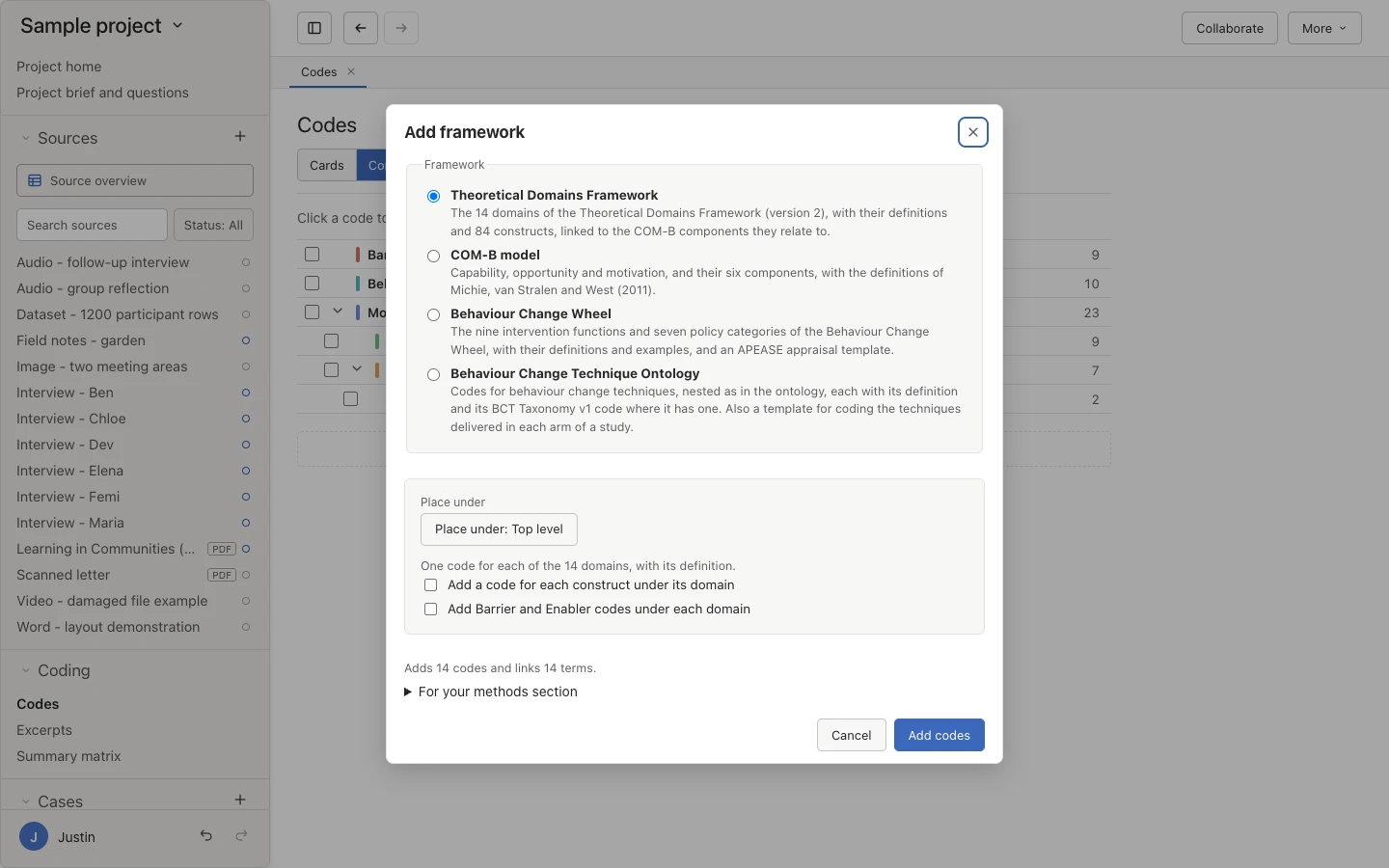
Add a framework Add a framework’s codes with their published definitions. 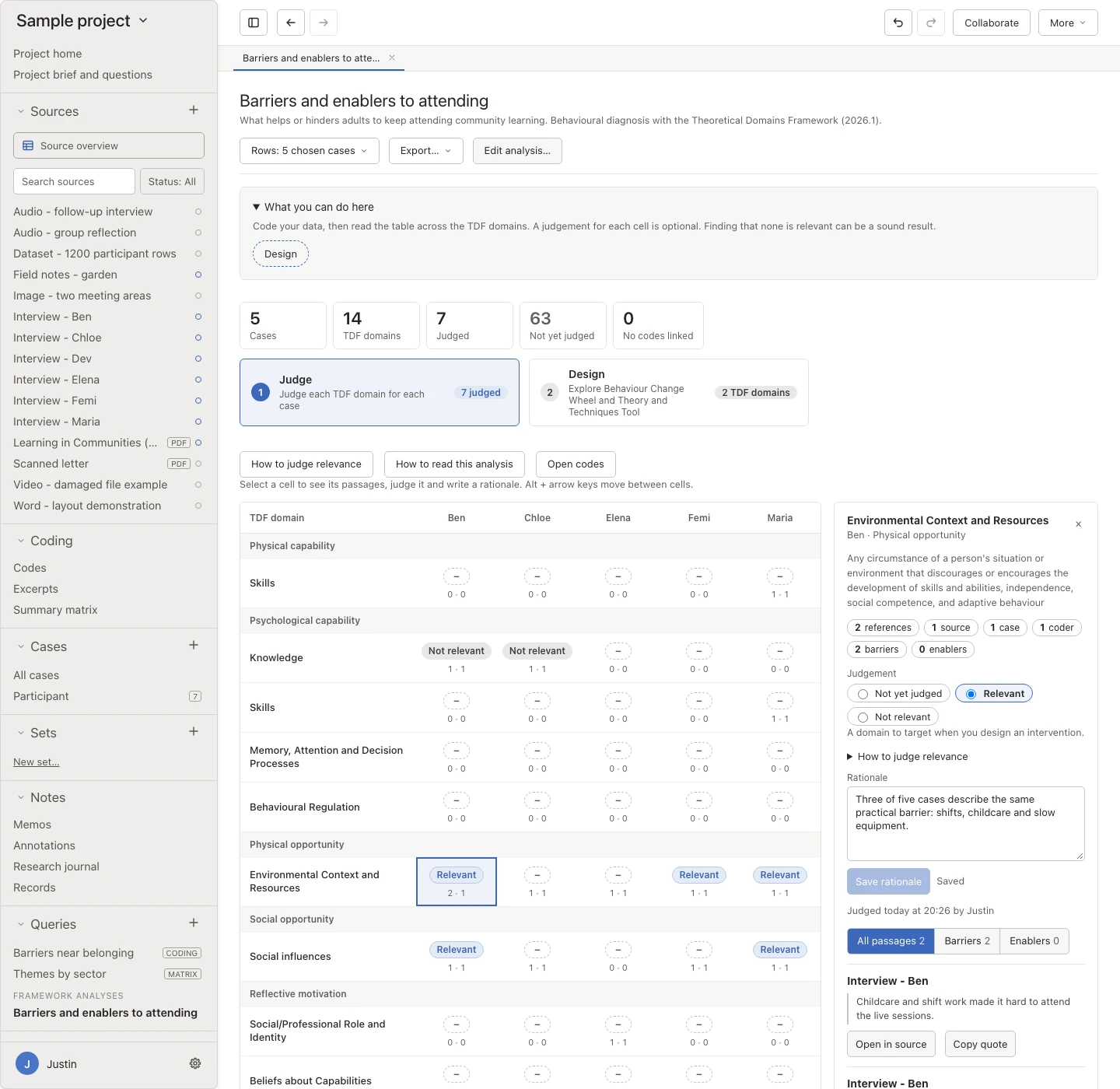
Behavioural diagnosis Judge each TDF domain case by case, with a rationale. 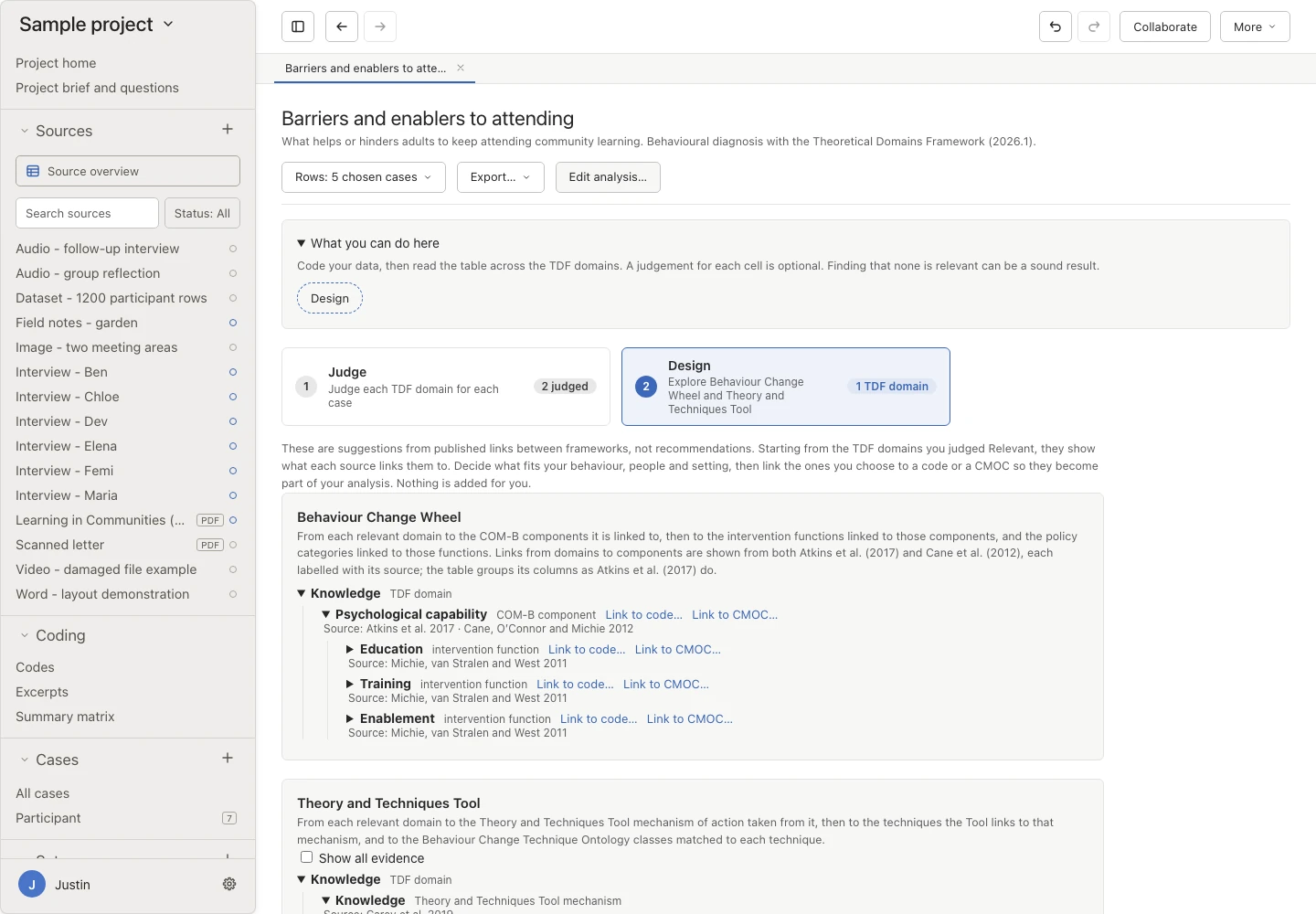
Intervention design Follow published links from domains to intervention options. 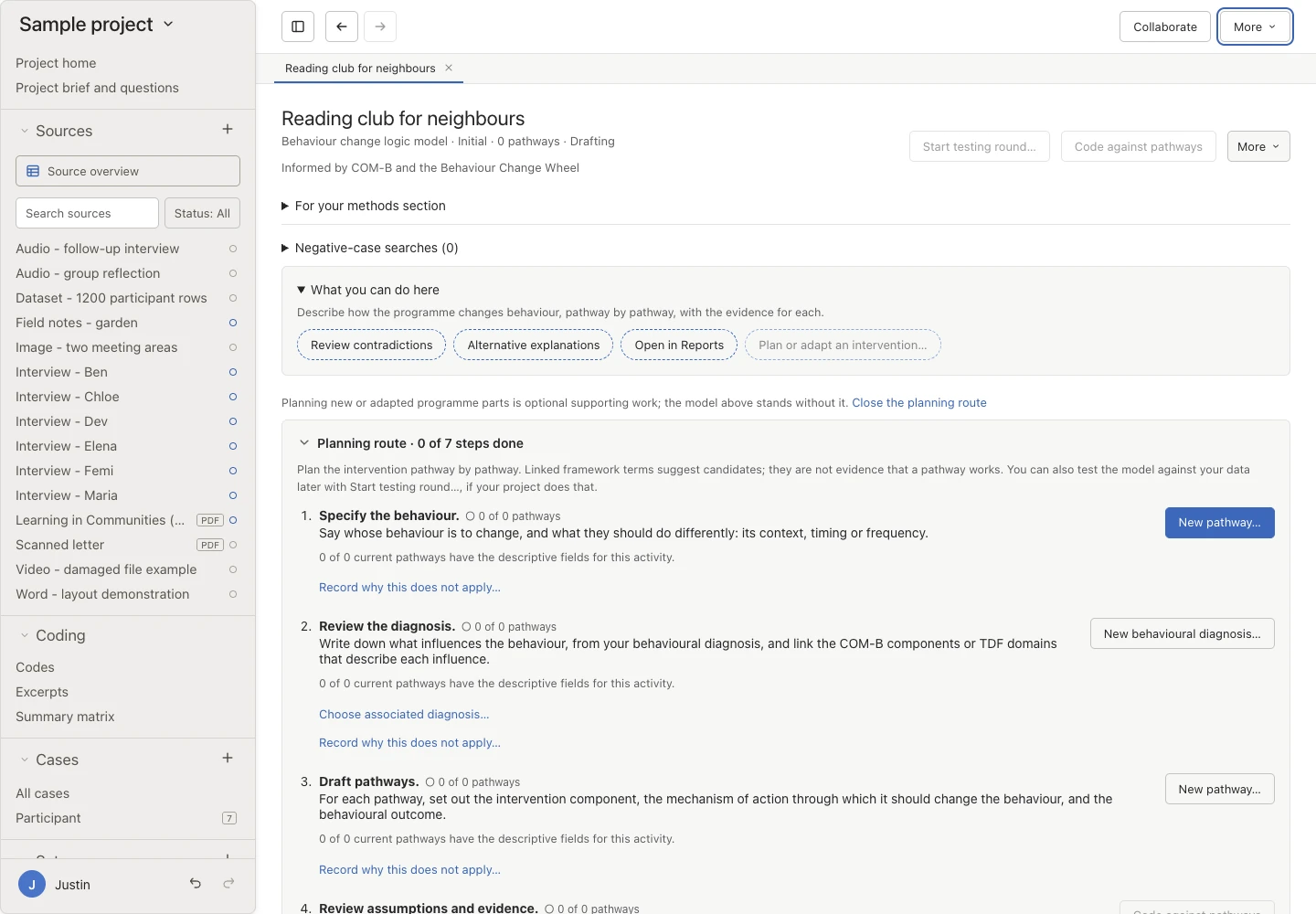
Planning route Plan or adapt an intervention in seven steps.
The planning route on a behaviour change logic model, whenever you choose to open it
- 1Specify the behaviour
- 2Review the diagnosis
- 3Draft pathways
- 4Review assumptions and evidence
- 5Select and specify components
- 6Define the evaluation
- 7Review the plan
Sources: every name, definition, and link comes from the framework’s published sources, such as Cane et al. (2012), Michie et al. (2011), and Atkins et al. (2017), each cited in a For your methods section note. Oriel doesn’t mark a domain as relevant for you.
Implementation science
See what helped or hindered, site by site.
Code with CFIR, ERIC, EPIS, Normalisation Process Theory, RE-AIM, and implementation outcomes, rate each case, compare groups of cases, build logic models, and keep dated records of strategies and adaptations.
Rate a construct from the menu in its cell, with the published rating guide beside the passages. Each rating is one step you can undo.
- 1Add a framework
- 2Code your data
- 3Rate each case
- 4Compare groups
- 5Plan and record strategies
Start from your home page
Choose implementation as an area of enquiry, or switch on Implementation science in any project. Your home page then offers Methods and frameworks, Add framework, and New framework analysis, and suggests Compare sites or groups.
Framework packs
Add codes for the updated CFIR (2022) with its domains, 48 constructs, and subconstructs, the 73 ERIC strategies in nine clusters, EPIS contexts, factors, and phases, the NPT coding manual, and RE-AIM, each with its published definition.
Code implementation outcomes
Code with the CFIR Outcomes Addendum, Proctor et al.’s implementation outcomes, or the RE-AIM dimensions, and link outcomes to your own codes.
Rate each case on a scale
A CFIR construct rating gives a row for each site, team, or participant and a column for each construct. Rate each cell from −2 to +2, or Missing, with a rationale and Damschroder and Lowery’s rating guide quoted in full.
Compare groups of cases
Group cases by an attribute, such as high and low implementation, and read their ratings side by side. Characterise whether each construct distinguishes the groups, with your rationale.
Explore implementation strategies
For each construct you rated as a barrier, see the ERIC strategies experts endorsed (Waltz et al. 2019), at Level 1 or Level 2, and link the ones you choose to a code.
Build logic models
Set out Implementation Research Logic Models whose pathways link a determinant, strategy, mechanism, and outcome. Link CFIR, ERIC, NPT, and outcome terms to each part, test them like any programme theory, or import one from a table.
Check strategies against the evidence
On a pathway with a CFIR construct and an ERIC strategy, see whether experts endorsed that strategy for that barrier, and link the strategy’s records.
Keep dated records
Every project can keep delivery and adaptation records. With Implementation science switched on, you can also specify each strategy and record adaptations to the intervention (FRAME) and changes to strategies (FRAME-IS). Link records to sources, passages, cases, and terms, and read them on a timeline or in a table.
Export ratings and records
Export ratings by case, comparisons of groups with every rationale, and records to CSV or Excel, ready for your tables.
| Case | Tension for Change | Available Resources |
|---|---|---|
| Site AHigh implementation | ||
| Site BHigh implementation | ||
| Site CLow implementation | ||
| Site DLow implementation |
Compare groups by Implementation
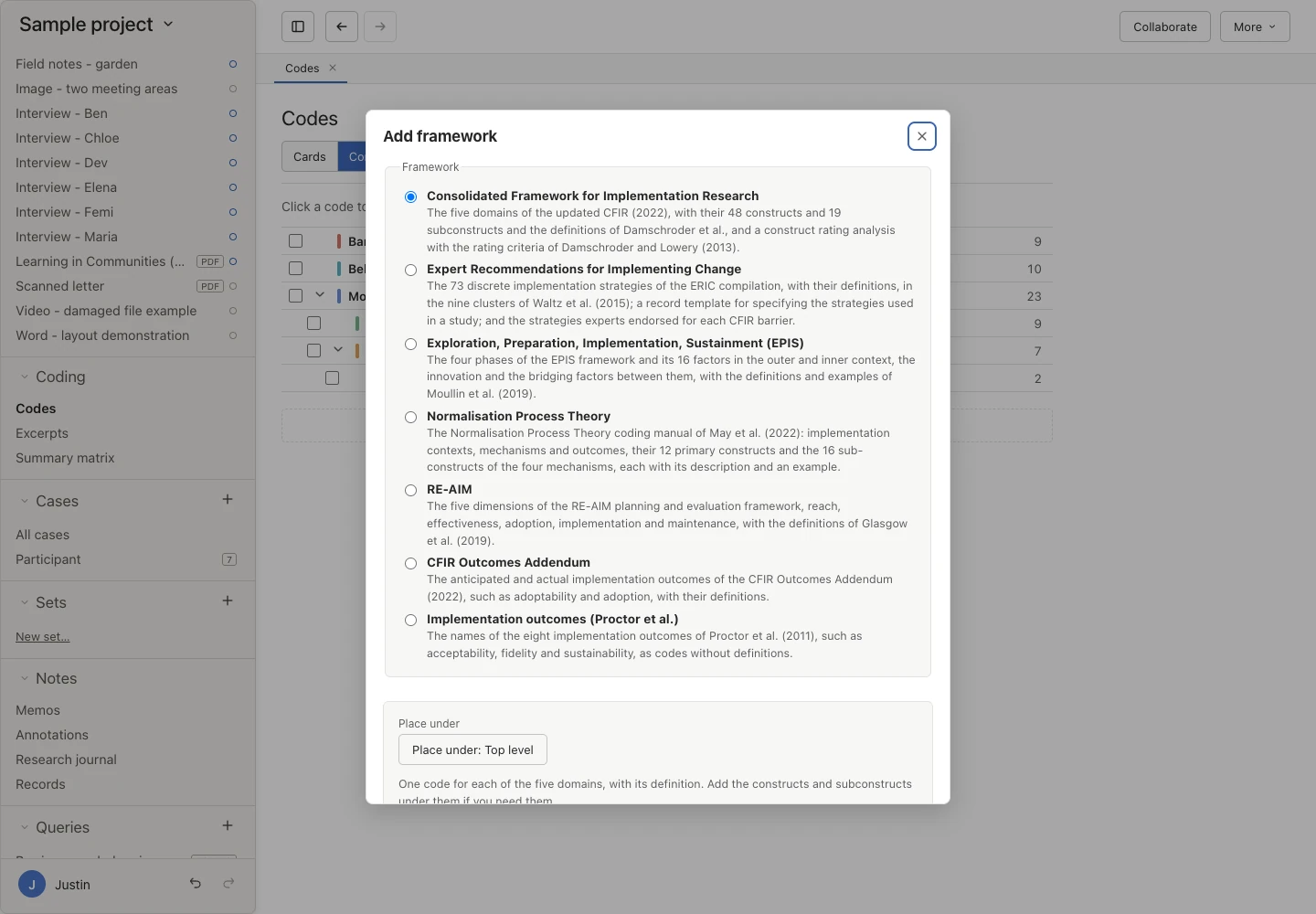
CFIR codes Add the CFIR’s domains and constructs. 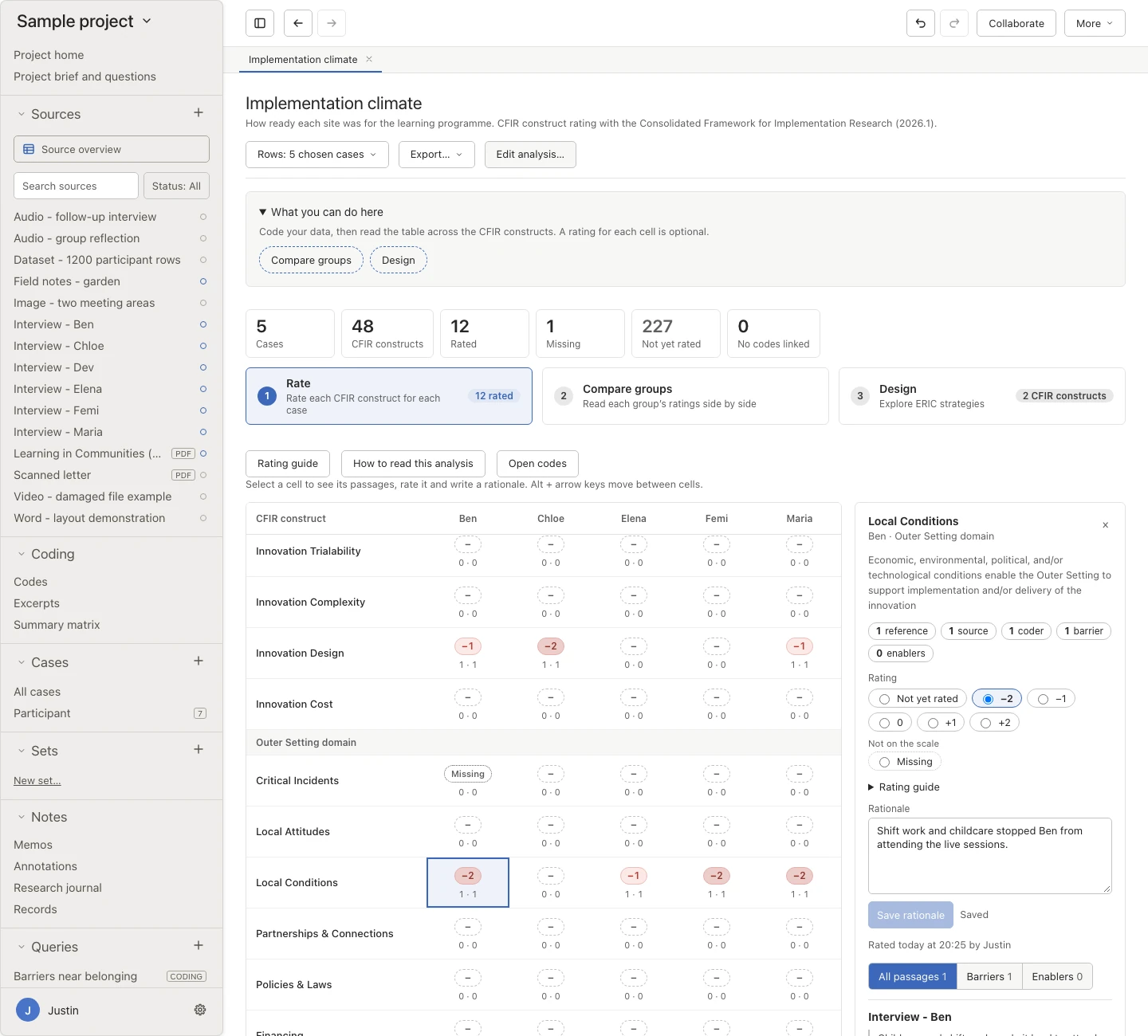
CFIR ratings Rate each construct for each site and say why. 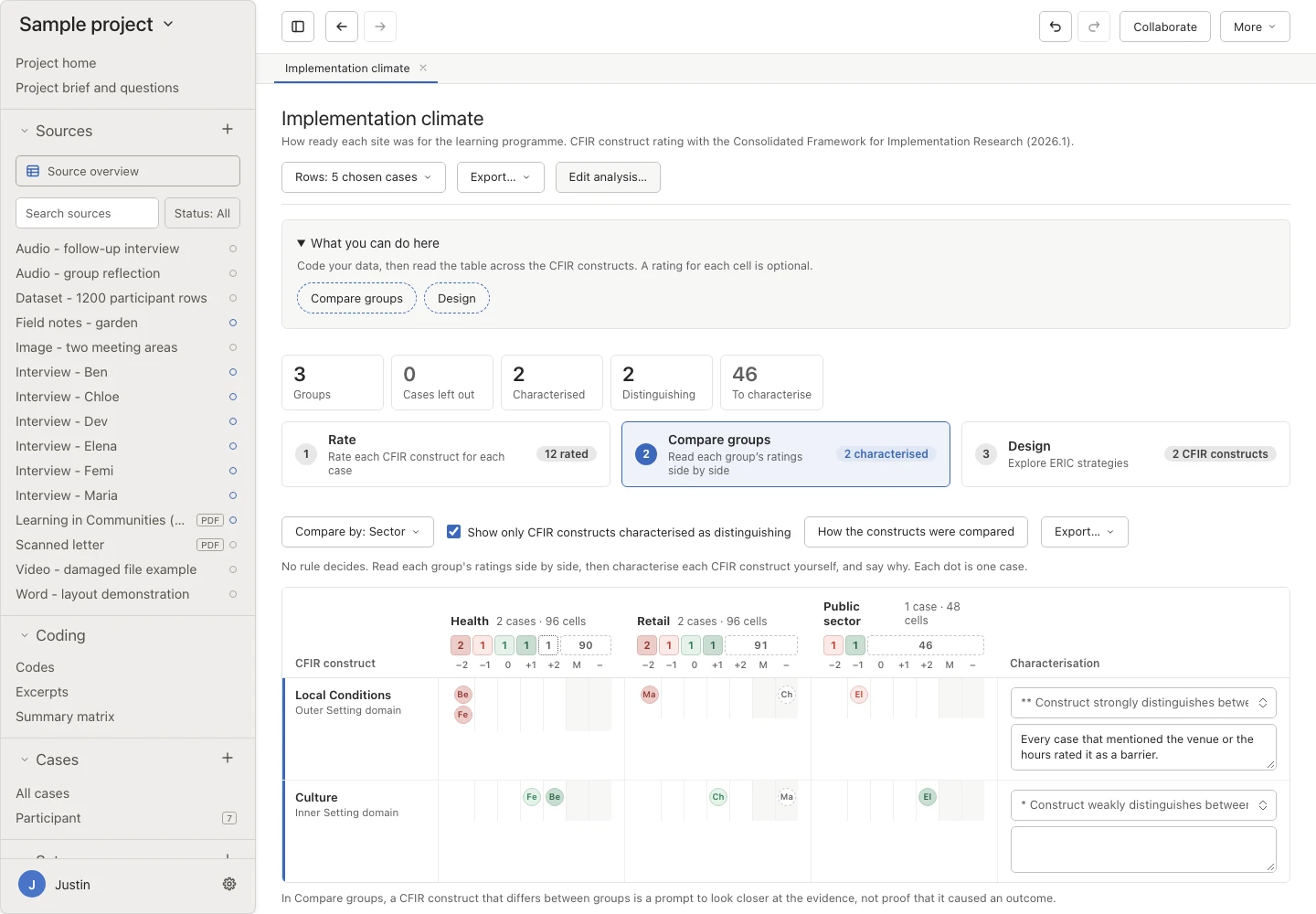
Compare groups Read ratings side by side for groups of sites. 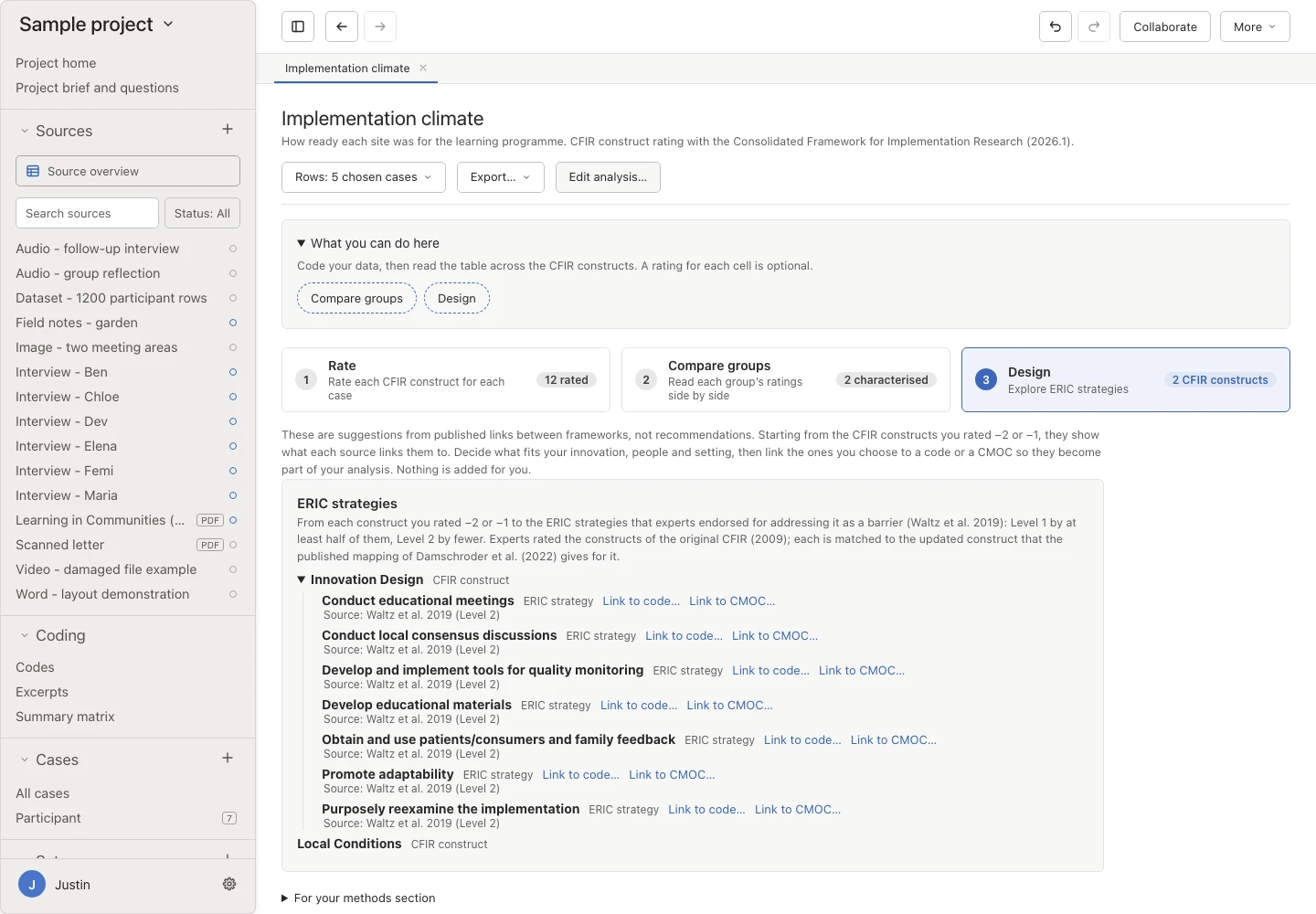
ERIC strategies See the strategies experts endorsed for each barrier. 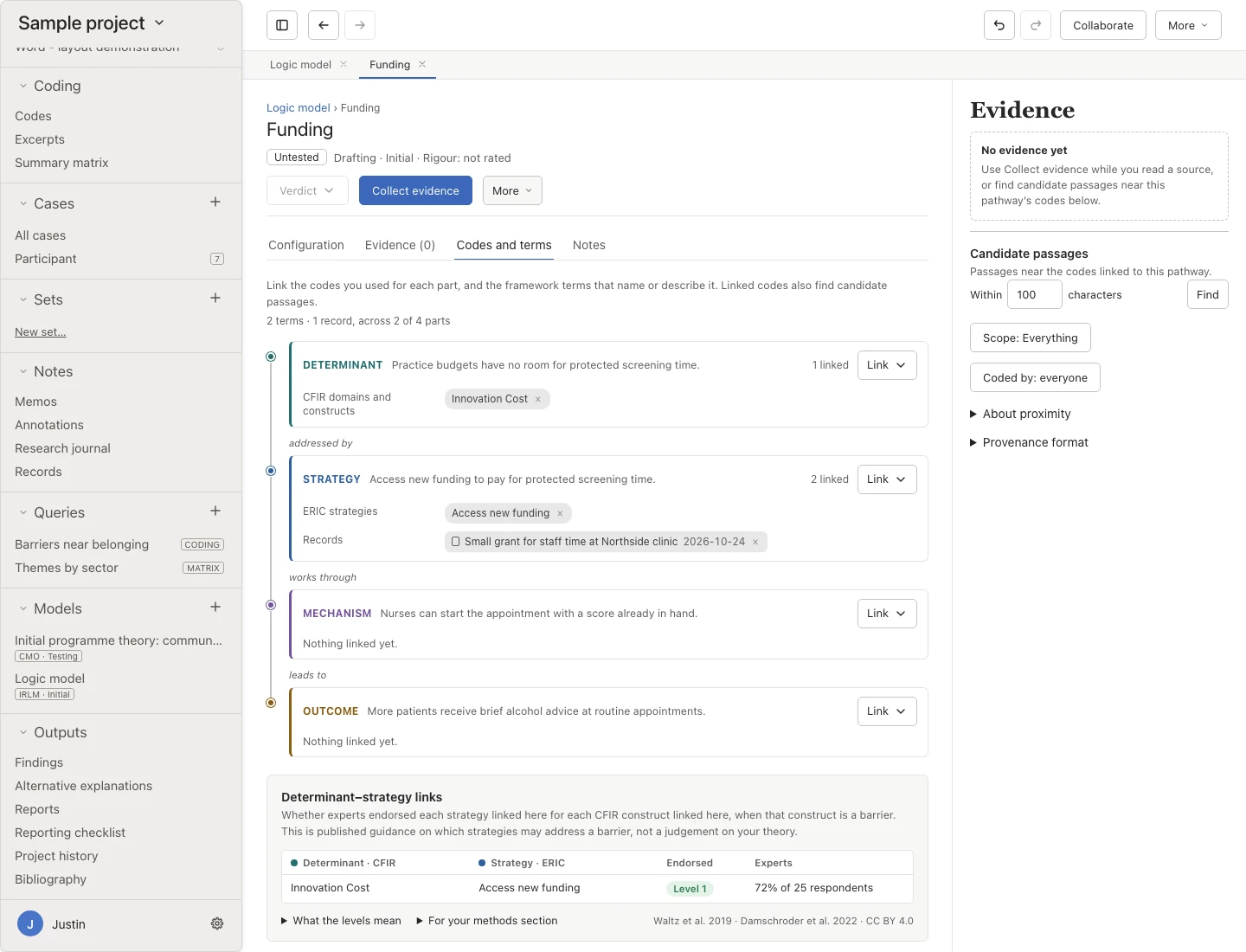
Logic model Link each pathway to your codes and framework terms. 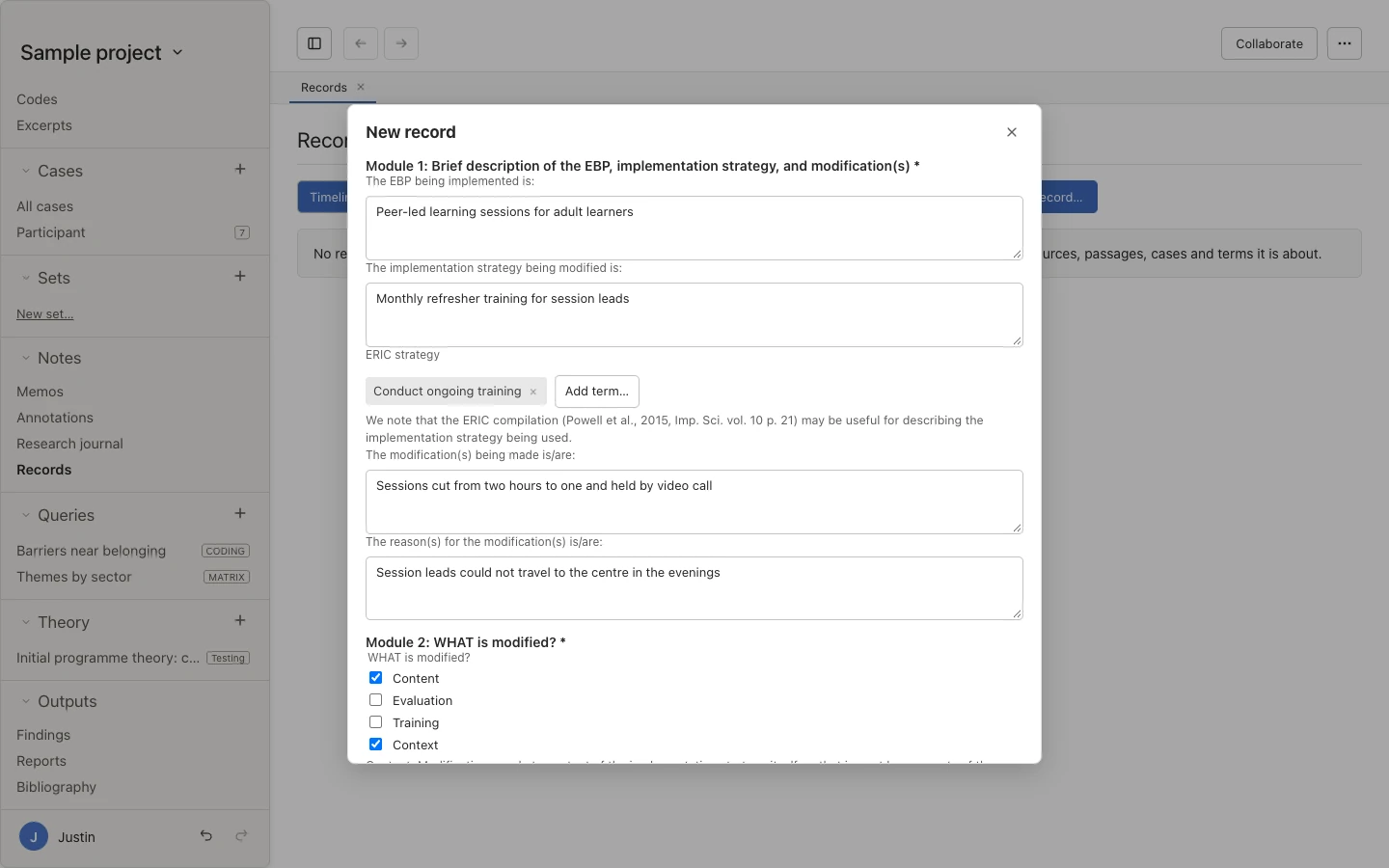
Adaptation record Record a change to a strategy with FRAME-IS.
Sources: every name, definition, rating scale, and category is copied from the published sources, such as Damschroder et al. (2022), Powell et al. (2015), Damschroder and Lowery (2013), Waltz et al. (2019), and Smith, Li, and Rafferty (2020). Expert endorsements are published guidance rather than a judgement on your study, and Oriel doesn’t rate a case for you.
Write it up
Report what happened and why.
Bring ratings, records, and findings together, and check your report against the standards for implementation studies.
Check against a reporting checklist New
Choose StaRI for an implementation study, or COREQ or SRQR for the qualitative work, and note where your project, or one section of your findings, addresses each item. You decide what has been addressed. Oriel doesn’t mark items for you or give a score.
Weigh alternative explanations New
Record other ways the evidence could be read, whether for a finding, part of a model, a research question, or a whole model. For each one, note whether it was examined and not supported, retained as plausible, or incorporated into a finding, and why.
Export a connected account
Export findings to Word, PDF, or Markdown, with quotation details and optional appendices, such as a findings-by-cases evidence table and a log of the negative cases you considered. You can also organise the report by research question.
Quotes straight into Word New
Export a quotes file, then use the free Oriel Quotes for Word add-in to insert coded passages as quotes with pseudonymised participant labels. You can add a participant table and refresh the quotes when your analysis changes. The add-in only reads the file you choose.
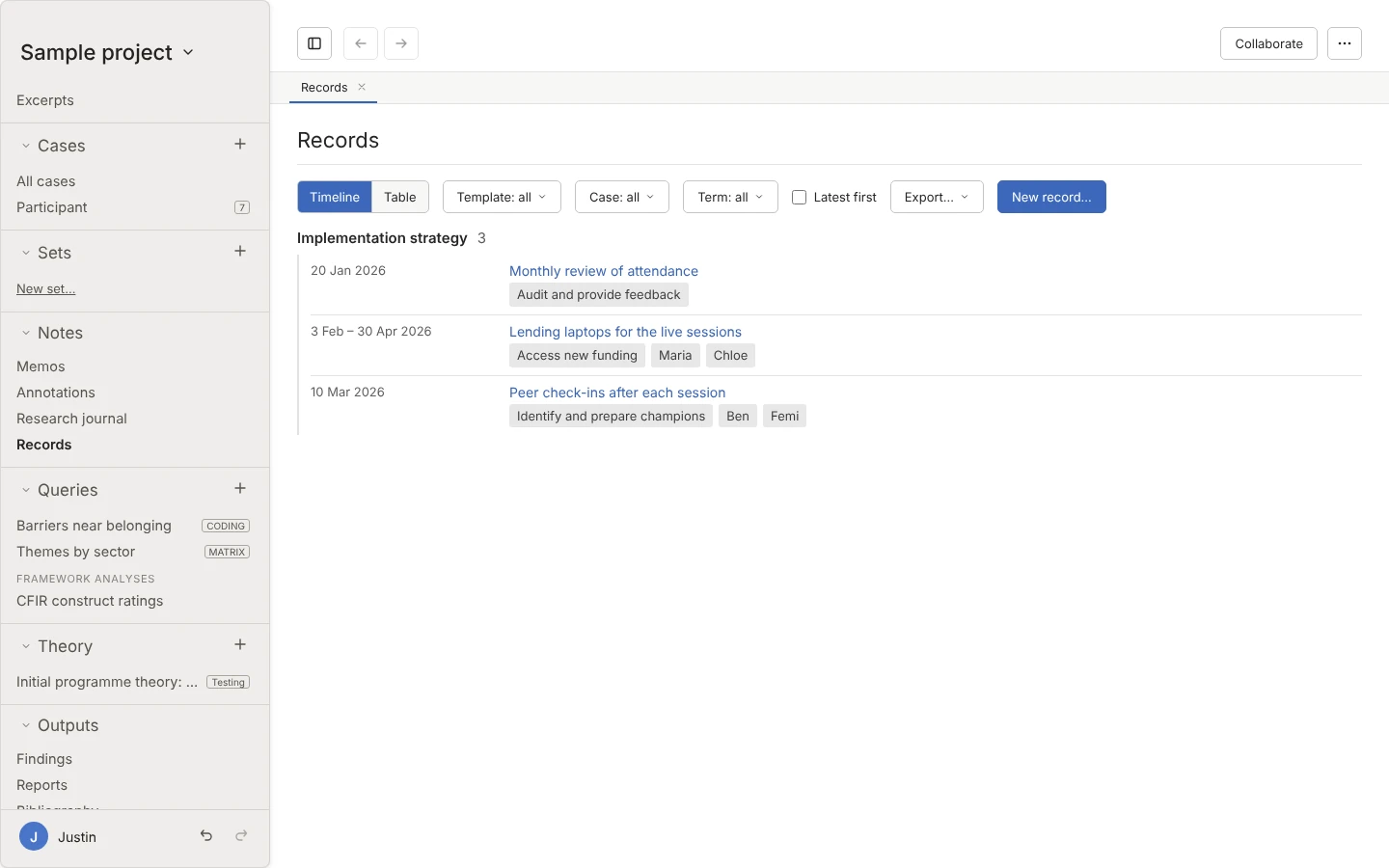
Strategy records Read your records on a timeline or in a table. 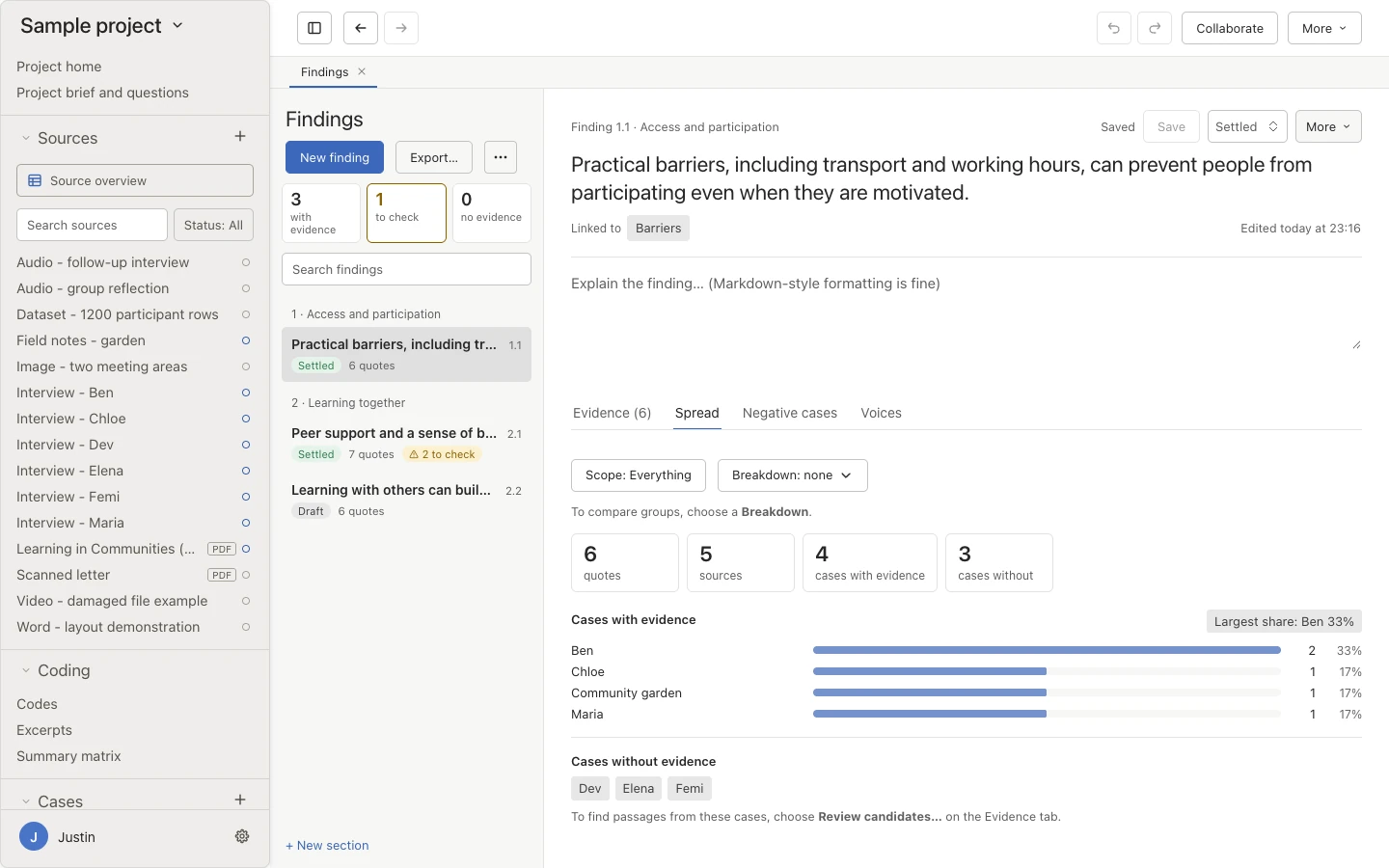
Evidence spread Check where a finding’s evidence comes from.
Oriel’s maker also teaches implementation science. See the Implementation Science CPD page for the masterclass.
Try it on your own evaluation.
Download Oriel, then follow the programme evaluation track in the quick start, from the stages on your home page to delivery and adaptation records.