 Oriel
Version 0.97.1 beta out now
Oriel for qualitative evidence synthesis
Review published studies and keep every finding traceable.
Link reports to studies, agree one review protocol, extract and appraise beside each report, reconcile two reviewers’ work, and carry each study’s contribution into your findings and CERQual judgements.
The same study review tools support a realist review alongside Oriel’s realist tools. Oriel is free for Windows and Mac.
Who it’s for
For reviews of qualitative research.
Choose evidence synthesis when you create a project, then choose qualitative evidence synthesis, realist review, or your own approach.
Thematic synthesis
Code the findings of each included study, group your codes into descriptive themes, and develop analytical themes, with each study’s contribution recorded.
Meta-ethnography
Extract each study’s key concepts beside the report, compare them study by study in a matrix, and report against eMERGe.
Framework synthesis
Add a published framework’s codes, such as the TDF or CFIR, and code each study’s findings against it.
Your own approach
Describe your approach in the project brief and switch on only the tools you need.
The review pathway
From a stack of papers to findings you can trace.
A qualitative evidence synthesis follows one pathway. You link reports to studies, agree a protocol, extract and appraise, reconcile, and then use the evidence in your findings.
Create a study from every paper in one step. Fields save as you type, and Agree all matching values settles every identical answer at once.
- 1Link reports to studies
- 2Agree the protocol
- 3Extract and appraise
- 4Reconcile
- 5Use in findings
Keep studies and reports distinct
A study with several papers counts once, and a paper describing several studies links to each. Create studies from sources in bulk, merge them, record sample overlap, and import screening outcomes from CSV or Excel, or set the inclusion status of several studies at once. Oriel doesn’t match studies by title.
See progress at a glance
The Studies list doubles as a progress table, showing reports linked, your extraction progress, reviewers who have submitted, agreed values, and appraisal status.
Agree one review protocol
Build extraction and appraisal templates from editable starters, with text, number, date, choice, and repeatable group fields. Used versions are frozen, and reviewers move their values to a new version with a preview.
Set your review process New
Choose one reviewer, one reviewer checked by a second, or two reviewers who agree their differences. Oriel uses your choice to show when extraction and appraisal are ready. A submitted form on its own isn’t treated as checked.
Extract beside the report
Each field autosaves while the report stays open beside the form. Mark a field Not reported or Not applicable, and add exact supporting quotations from your selection.
Appraise without a score
Record structured appraisal, such as methodological limitations, question by question with your rationale. Oriel doesn’t calculate a quality score.
Reconcile independent reviews
Once two reviewers have submitted, compare their values side by side, agree what matches in one step, and resolve the differences with a note. If anything changes later, the agreement is marked Needs review.
Optional AI extraction proposals
Local AI can propose values beside each field, with the quotations it relied on. Every proposal needs your acceptance. AI doesn’t appraise studies, assess CERQual, or submit anything for you.
Analyse and report by study
Scope any query to studies, give each study its own matrix column, and group excerpts by study. A quotation added to a finding records that study’s contribution, with its codes.
Judge confidence with CERQual
Each reviewer writes their own CERQual judgement. An agreed assessment for reporting can draw on one reviewer’s judgement or bring several together. Oriel doesn’t average them, and each original judgement stays as it was written. If the evidence changes, the judgement is flagged for review. Sensitivity analysis shows how a finding looks without a particular study, without saving anything.
Export the review tables
Preview and export study characteristics, agreed extraction, appraisal, contributions, lineage, and a Summary of Qualitative Findings to Word, Excel, or CSV.
| Field | Reviewer A | Reviewer B | Status |
|---|---|---|---|
| Setting | Community centres | Community centres | Matches |
| Sample size | 24 | 24 | Matches |
| Data collection | Differs | ||
| Recruitment | Not reported | Not reported | Matches |
3 match · 1 differs
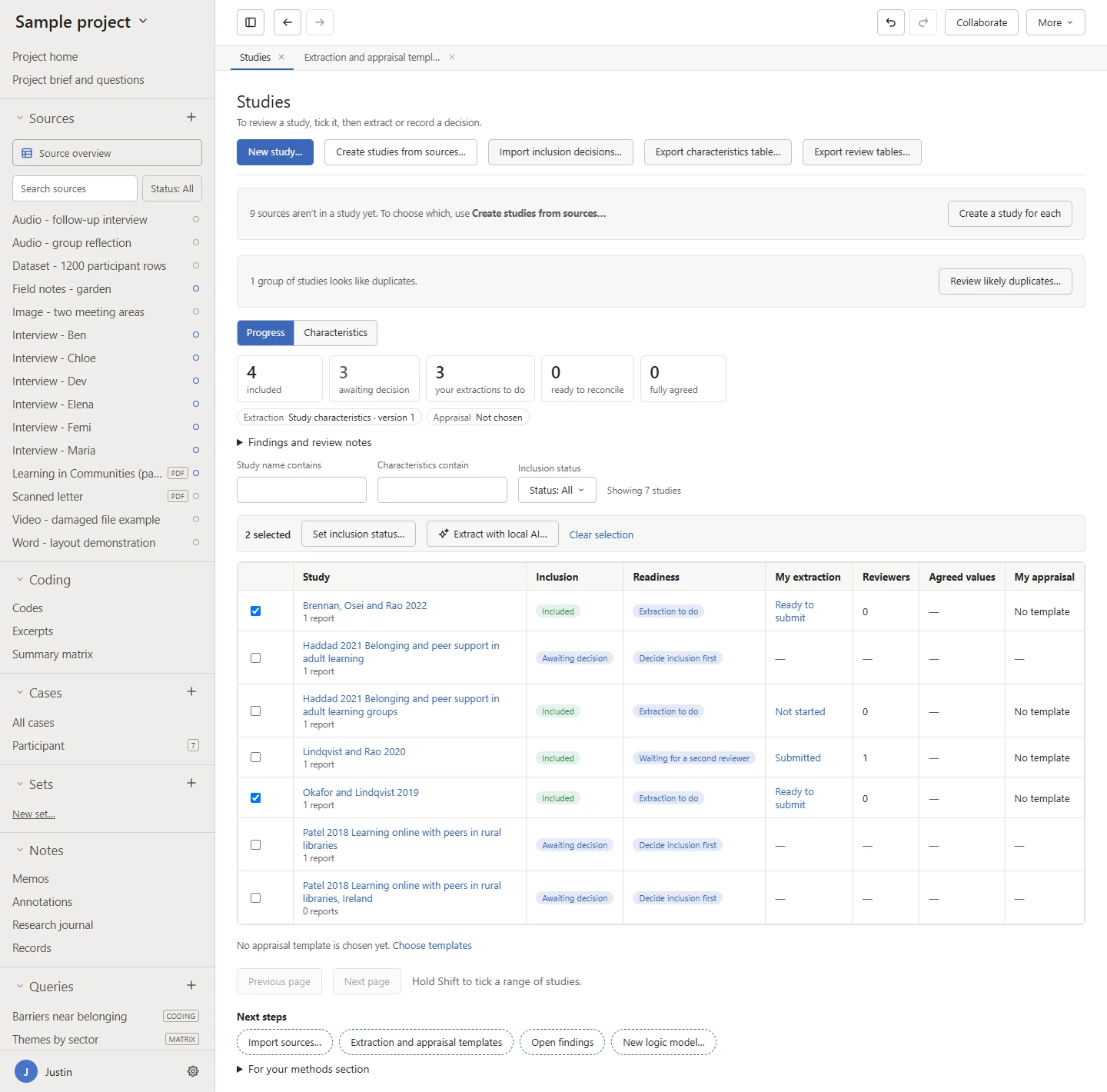
Study progress See what each study needs next. 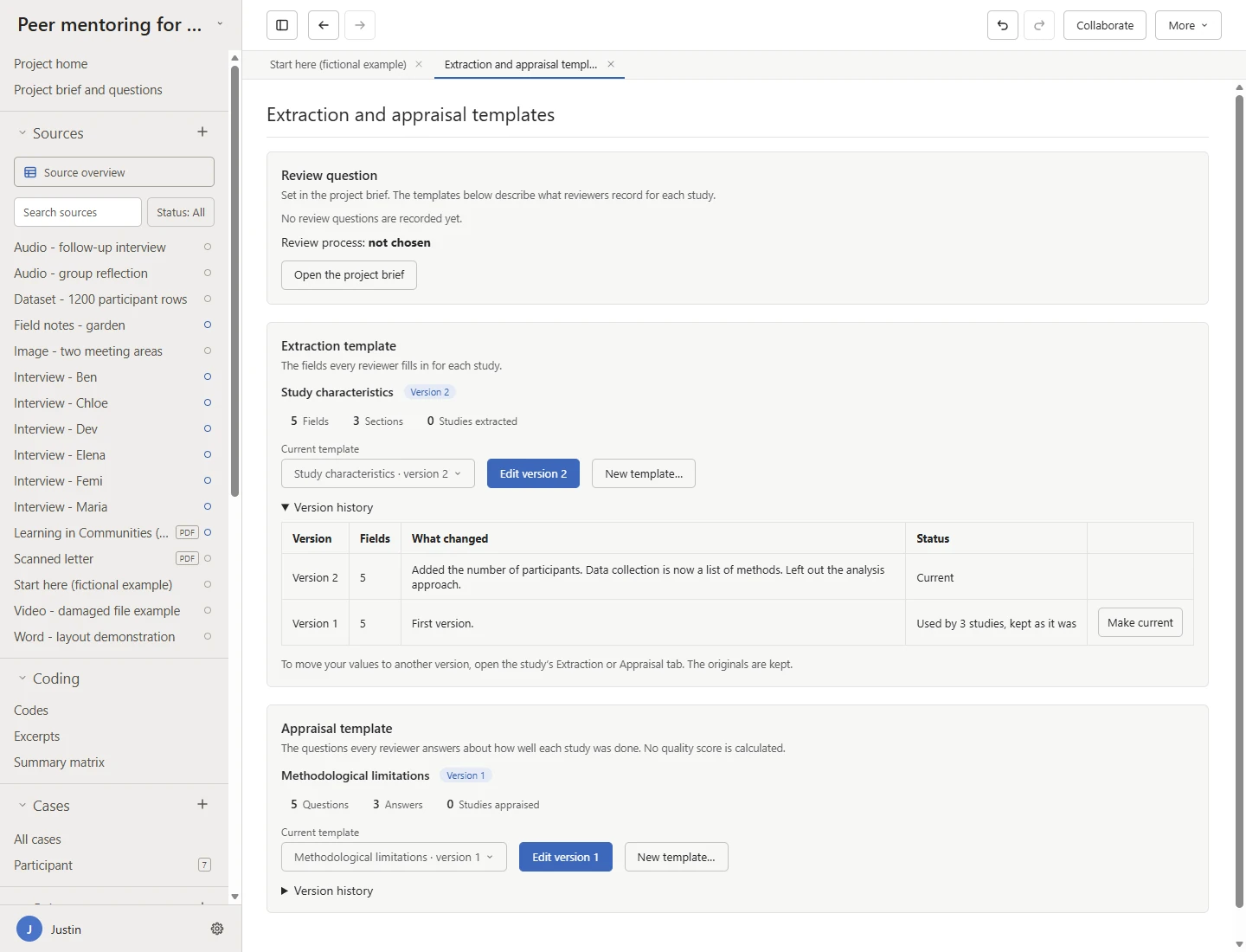
Review protocol Choose the templates every reviewer uses. 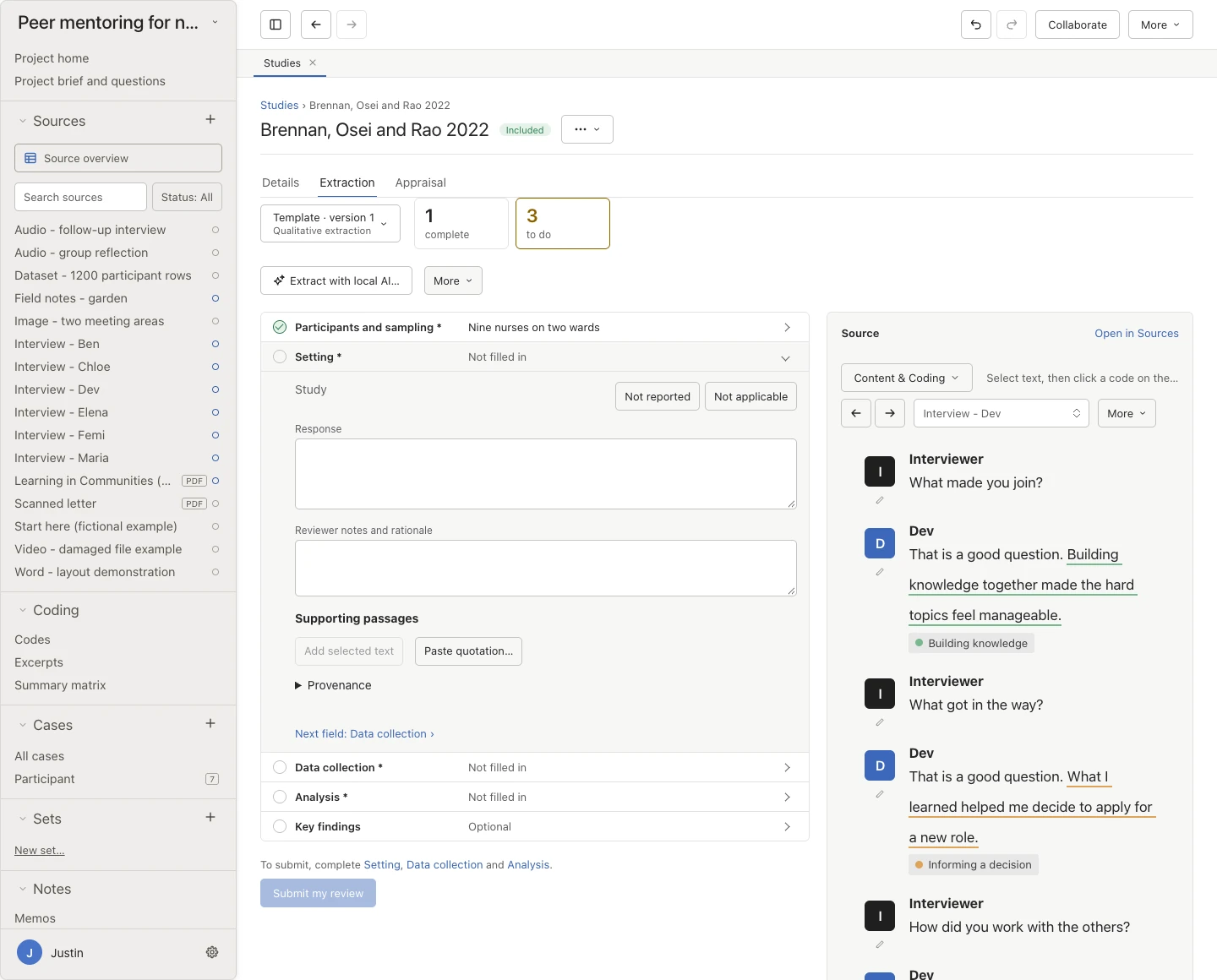
Extraction Complete each field beside the report. 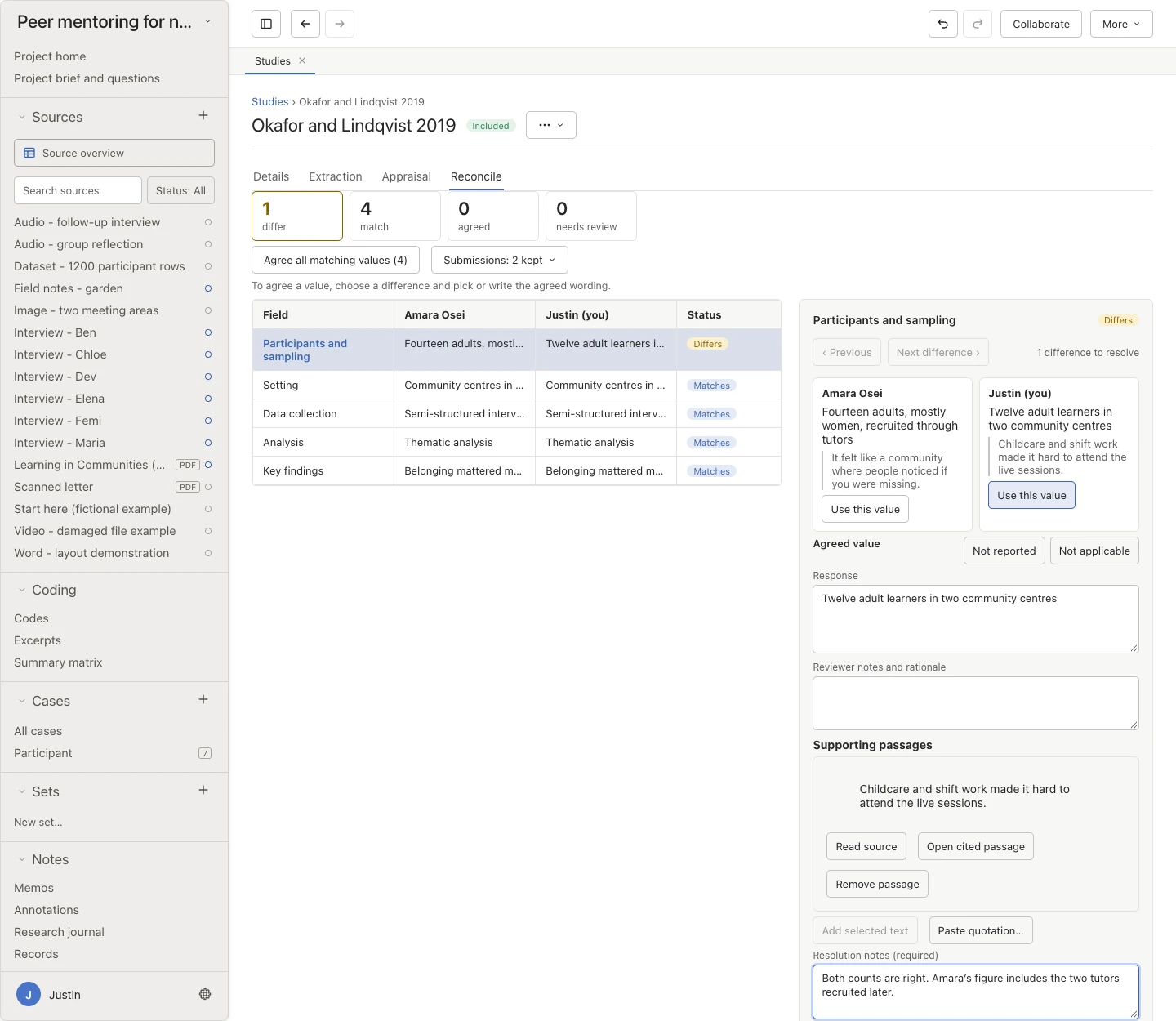
Reconcile Resolve a difference between reviewers with a note.
Scope: Oriel imports screening outcomes but doesn’t run searches, deduplicate records, or draw flow diagrams. Shared project files don’t technically blind reviewers from each other, and models can miss values, so read the reports and complete any missing fields yourself. Study review tools can be switched on alongside realist tools.
From studies to findings
Analyse across studies and show who contributes.
Once studies are extracted and appraised, analyse across them and write findings that show which studies support each one.
Compare in a coding matrix
Cross codes with cases, attribute values, or studies in a heatmap with totals, inspect each cell, and export the table.
Review the spread of evidence
See which cases support a finding and which have no evidence, whose voices appear across your write-up, and prompts for patterns that may need another look.
Weigh alternative explanations New
Record other ways the evidence could be read, whether for a finding, part of a model, a research question, or a whole model. For each one, note whether it was examined and not supported, retained as plausible, or incorporated into a finding, and why.
Templates for interventions
In an evidence synthesis, start from Intervention description, BCT coding, or APEASE appraisal templates, and add Ontology terms fields to any template.
Keep references with their documents
Import RIS, BibTeX, or EndNote XML, paste a reference list, or look up a DOI. The Bibliography, under Outputs, shows every reference once, with the documents it belongs to, in APA 7, Harvard, Vancouver, or Chicago author–date style.
Check against a reporting checklist New
Choose ENTREQ or eMERGe, and note where your project, or one section of your findings, addresses each item. You decide what has been addressed. Oriel doesn’t mark items for you or give a score.
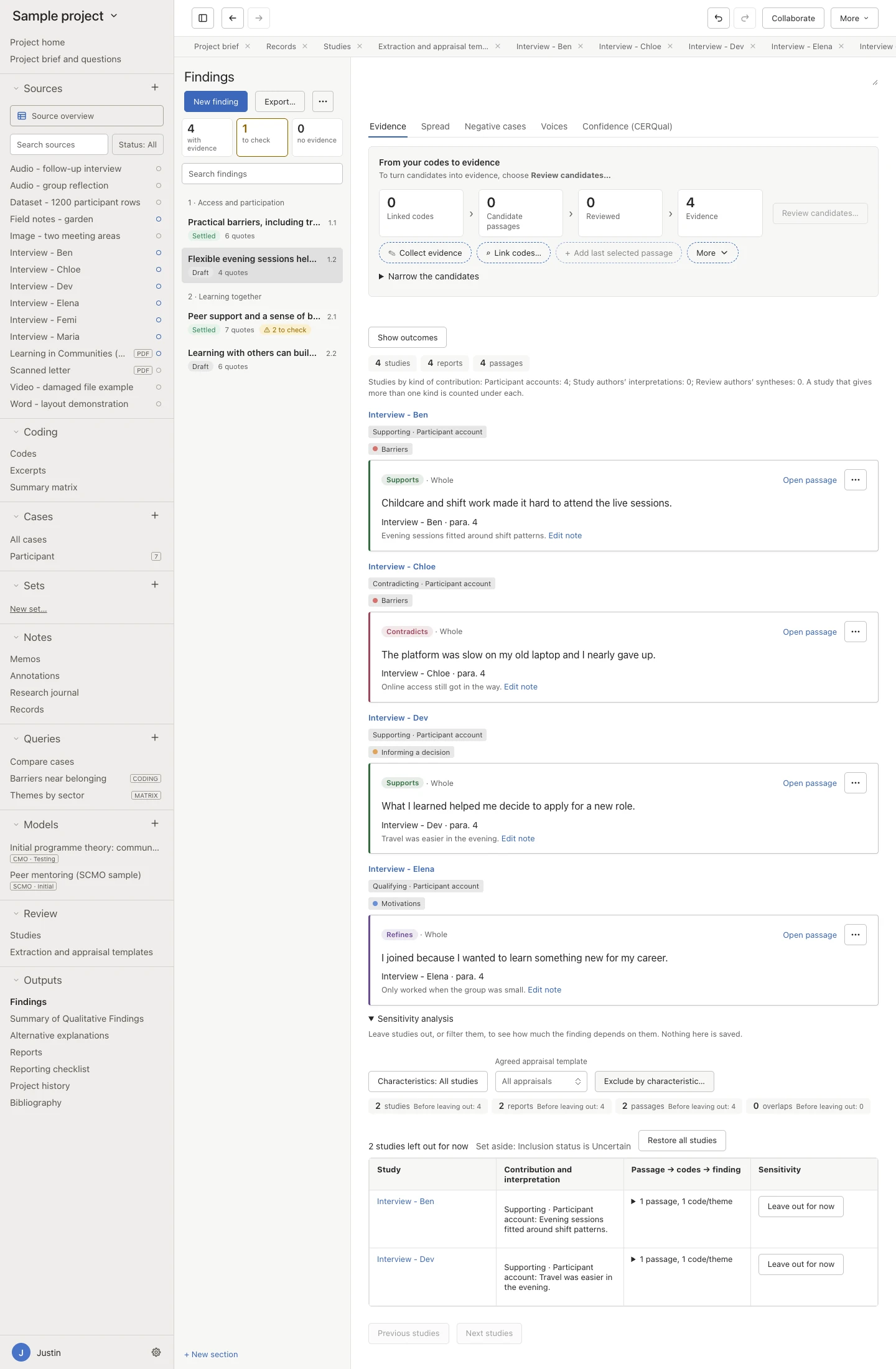
Contributions See a finding’s evidence study by study. 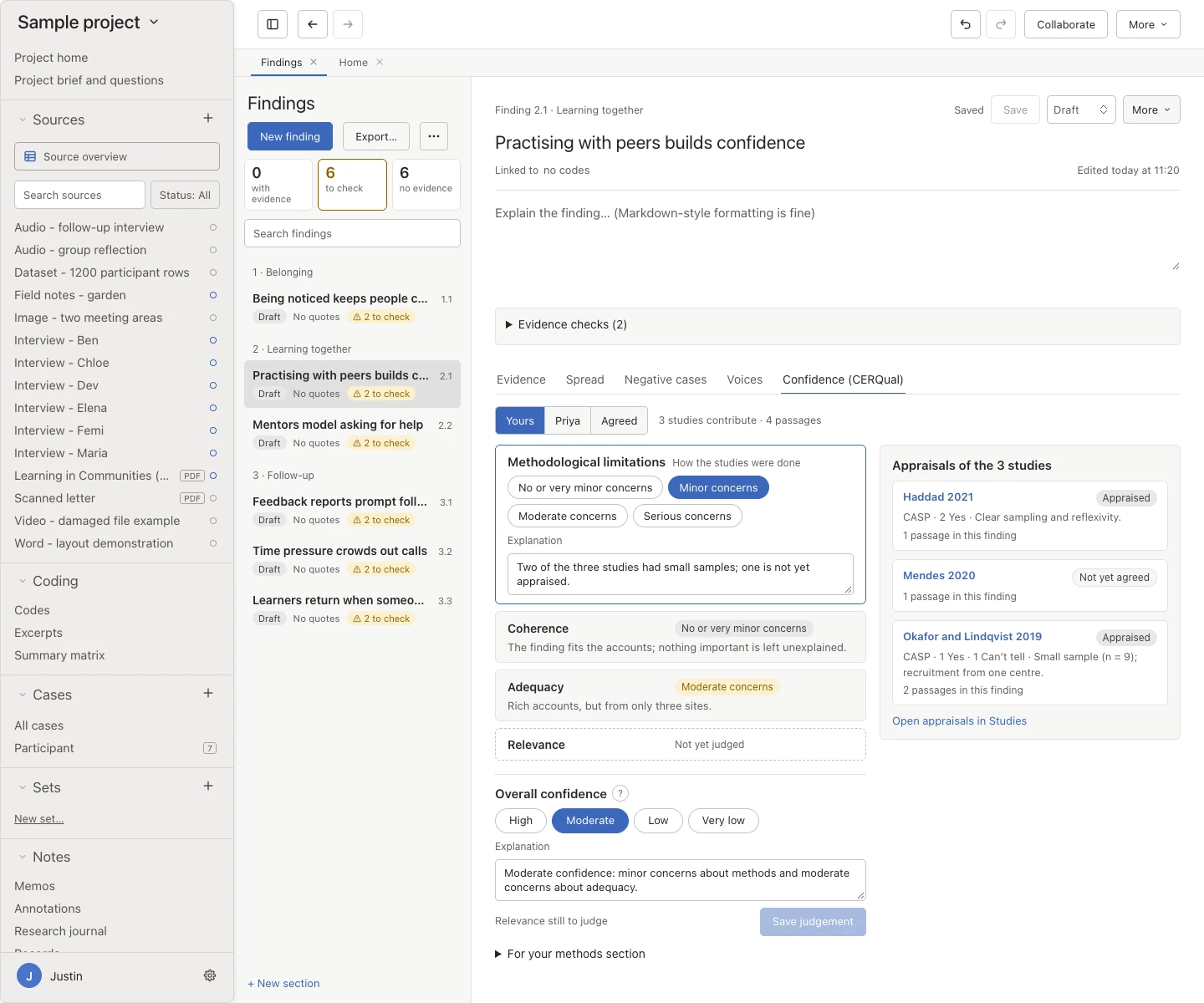
CERQual Record how confident you are in each finding. 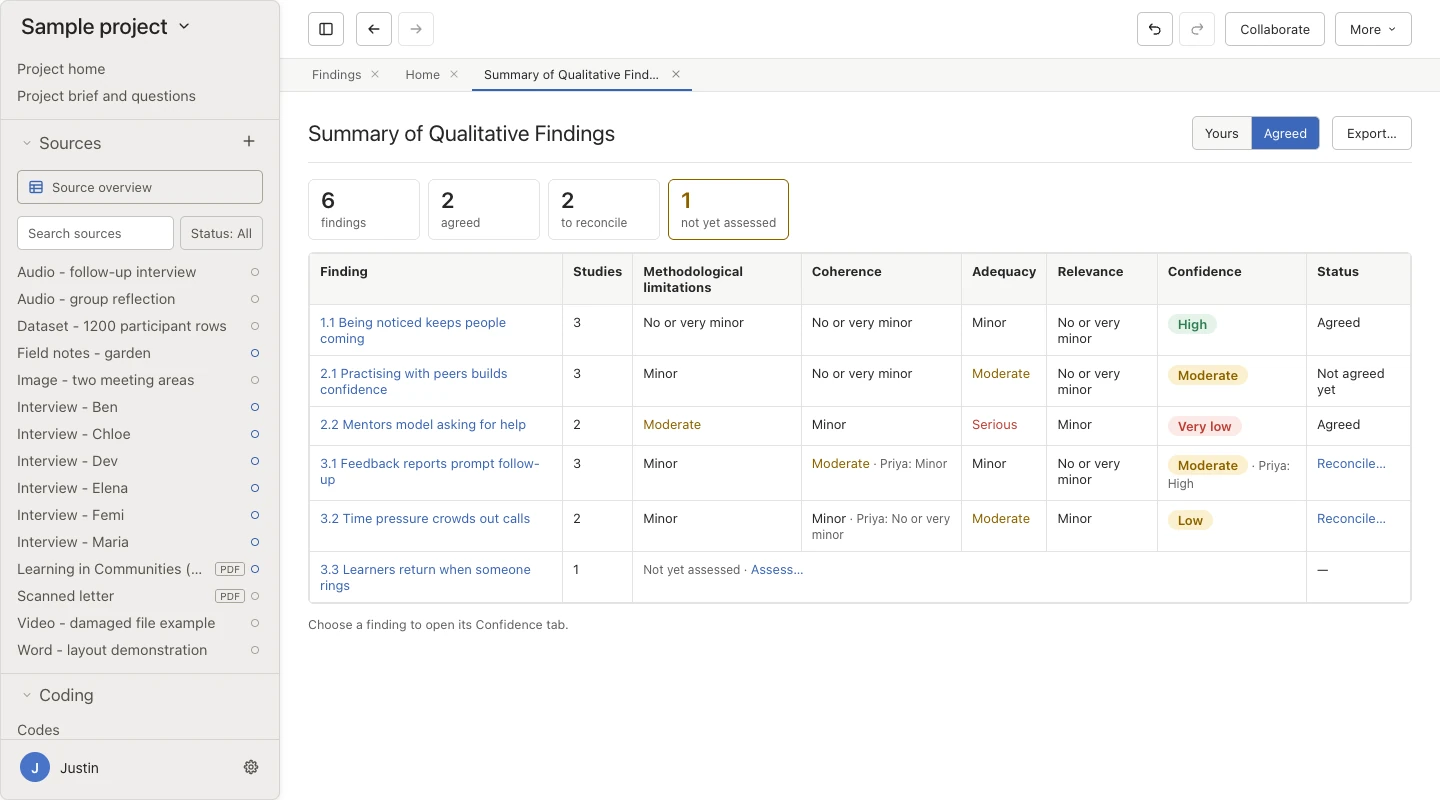
Summary of findings Read the Summary of Qualitative Findings table. 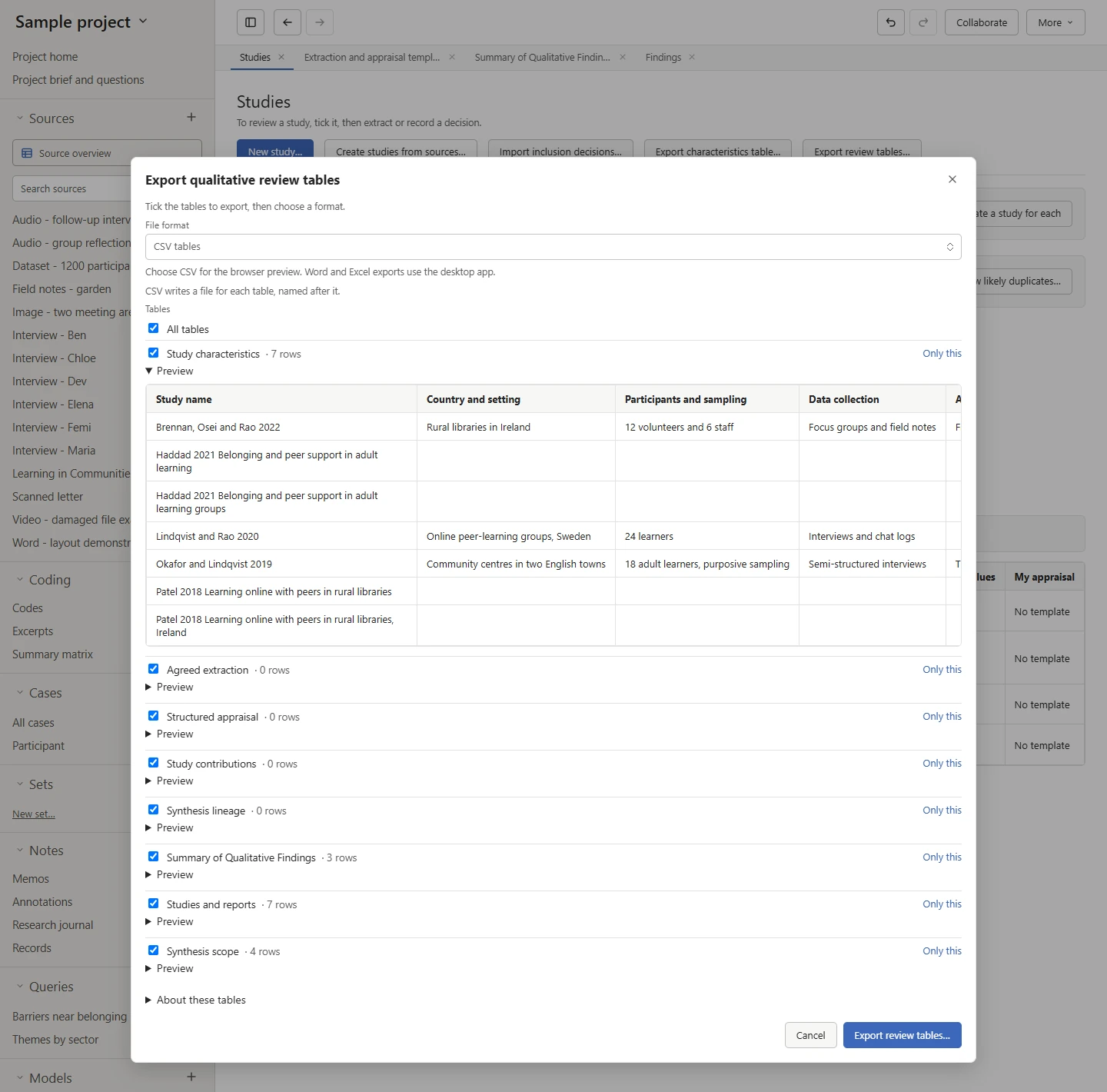
Review tables Preview tables for export to Word, Excel, or CSV.
Doing a realist review? It uses these same study tools alongside programme theory. See the realist page.
Moving over
Bring your studies and screening with you.
Start from the papers and decisions you already have, rather than retyping them.
Drag in files and folders
Drop files on a source folder, the Sources list, or anywhere in the window. A dropped folder becomes a source folder, with its sub-folders inside. Everything is also under File → Import.
Read documents in a useful form
Import TXT, Markdown, DOCX, DOC, RTF, and PDF files. A Word layout preview sits alongside the stable text used for coding. DOC and RTF formatting is kept on macOS, while Windows imports their text only.
Bring an NVivo project across
Import Windows .nvp or Mac .nvpx files without NVivo installed. A REFI-QDA .qdpx export or a codebook, preferably .qdc, restores names. Without one, some names may stay as placeholders.
Exchange through REFI-QDA
Import and export REFI-QDA projects and codebooks. Formats organise projects differently, so some information is lost, and export back to NVivo is not fully supported.
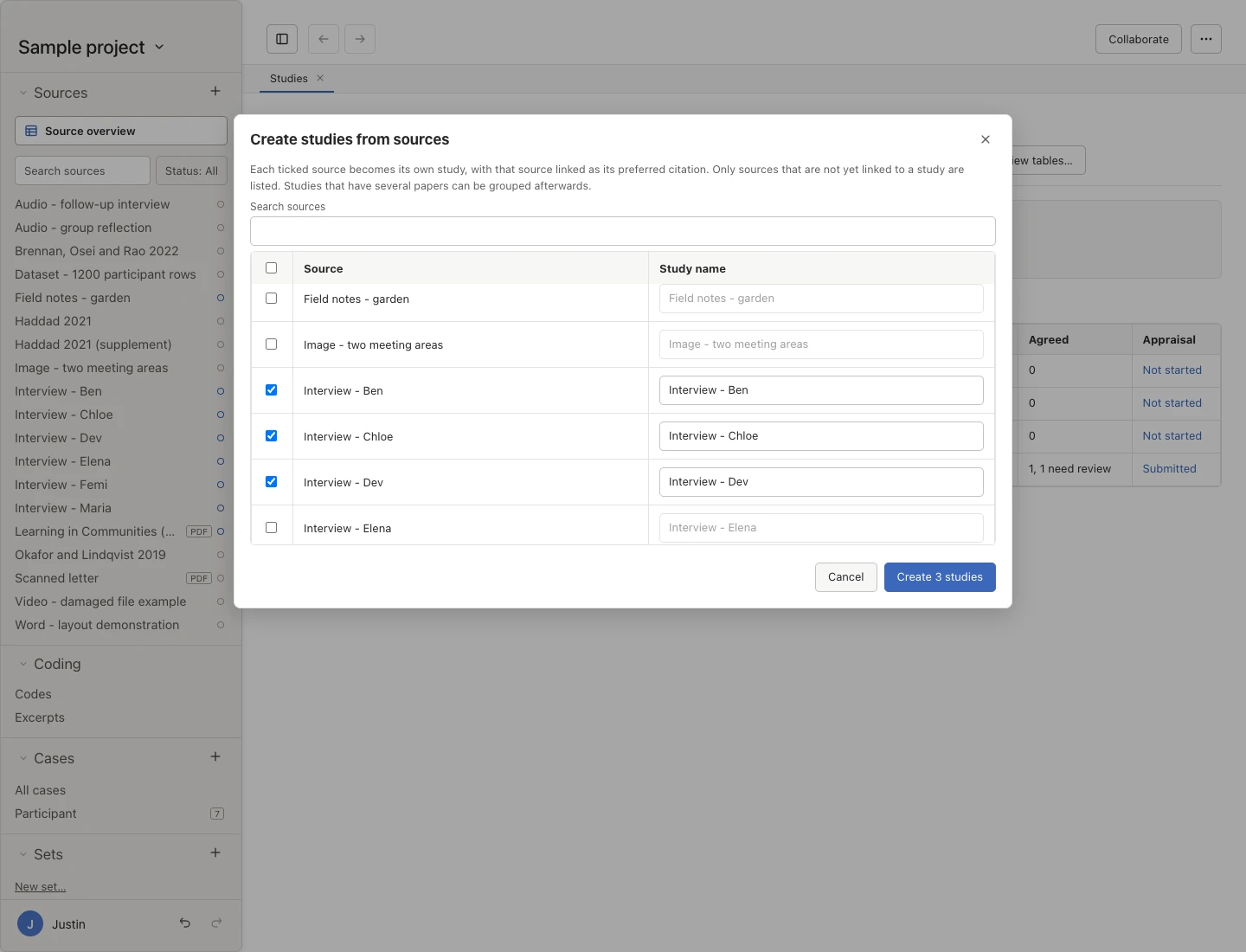
Create studies Make several studies from your sources at once. 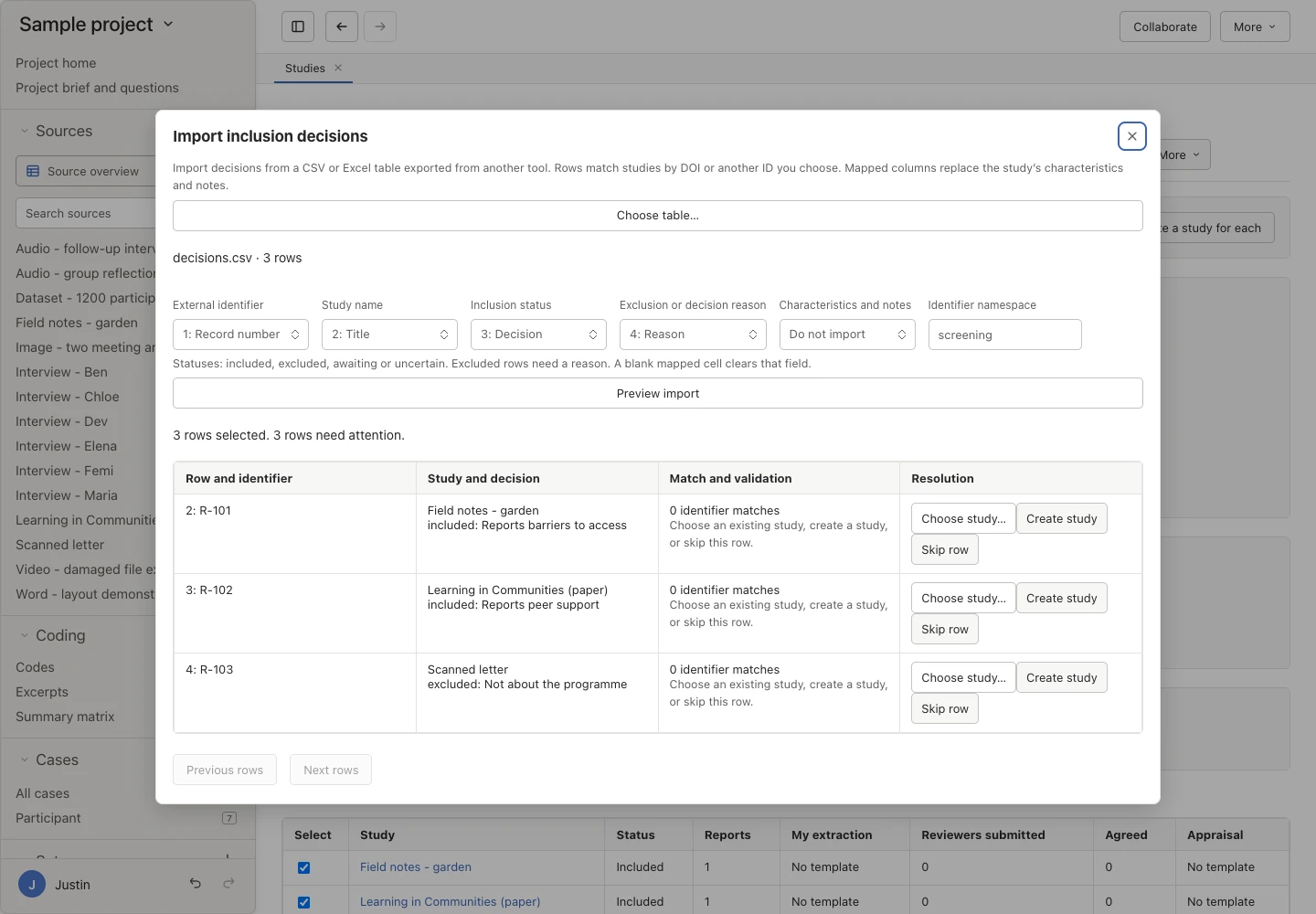
Screening import Map columns and match your inclusion decisions.
Try it on your own review.
Download Oriel, then follow the evidence synthesis track in the quick start, from choosing templates to judging your confidence.