 Oriel
Oriel
Transcribe on your computer
Turn recordings into text and tell speakers apart without uploading anything. Download a speech model once, then work offline.
 Oriel
Coming October 2026
Oriel
Coming October 2026
Fast, local qualitative research software, with speciality features for realist evaluation and synthesis, qualitative evidence synthesis, and behavioural science.
01 · Quick codes
Select a passage and the Quick codes card opens right beside it. Type a few letters, press Enter, and keep reading. Your codebook comes to you, nested codes and all.
Interviewer
What made you join?
Ben
That is a good question. I joined because I wanted to learn something new for my career. I was nervous about the maths, honestly.
Interviewer
How did you work with the others?
Ben
Building knowledge together made the hard topics feel manageable. When someone explained it a different way, I felt confident enough to have another go.
Interviewer
Was anything hard about coming each week?
Ben
The bus only runs every hour, so I missed a couple of sessions. But I kept coming back because people noticed when I wasn’t there.
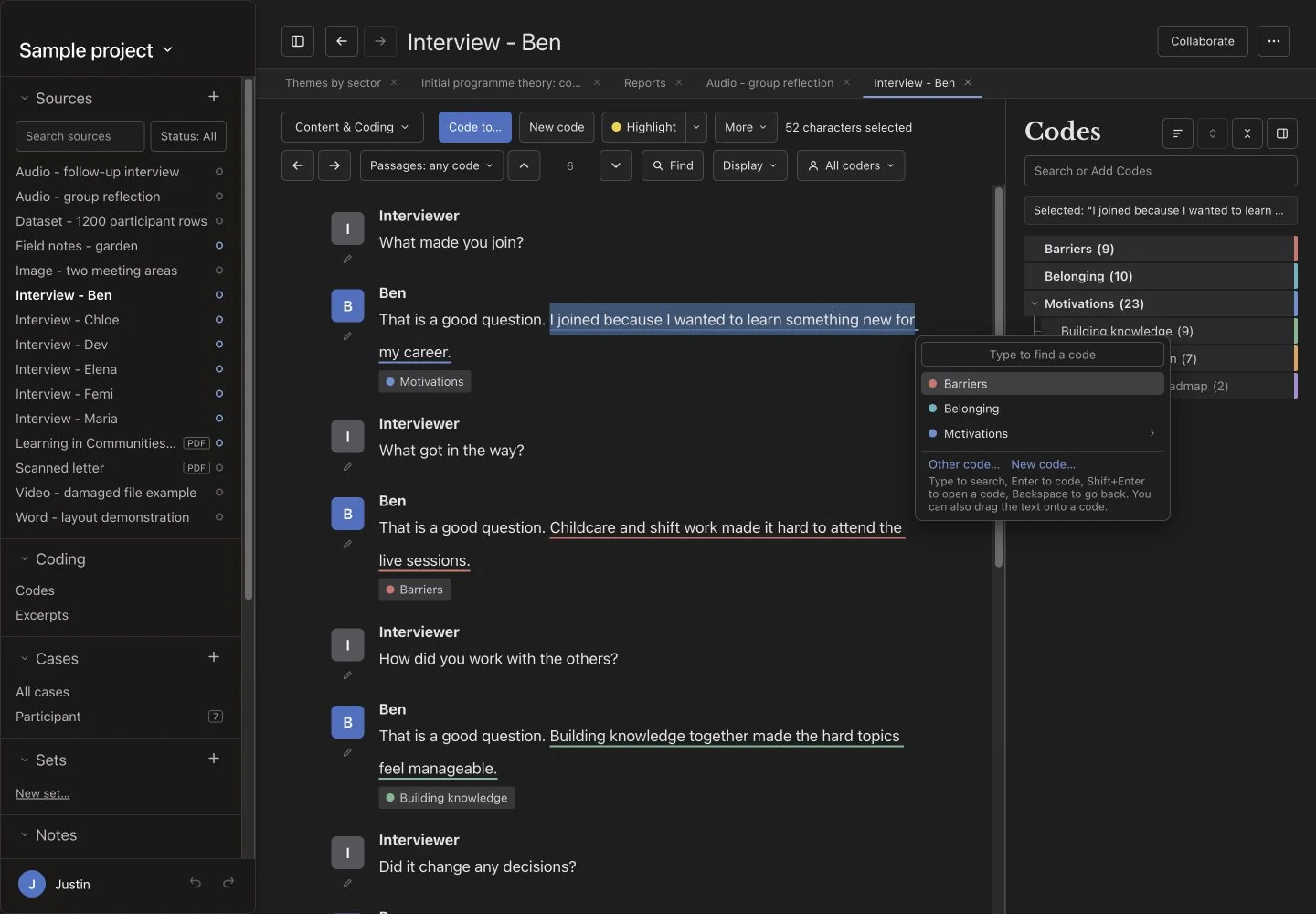
0 passages coded · 0 trips to the codebook
02 · The everyday toolkit
Turn recordings into text and tell speakers apart without uploading anything. Download a speech model once, then work offline.
Cross codes with cases or attributes in coding and framework matrices, then open any cell to read the passages behind it.
Co-occurrence networks and hierarchy charts show which codes overlap, and how often, across your sources.
Watch when new codes stop appearing as you work through your sources, to support decisions about when you have enough data.
Import NVivo projects with companion files to restore names, or exchange projects through REFI-QDA. Review transfer reports because some information does not carry across.
Preview reports, findings and codebooks, with each quotation’s source beneath it, then export them for your write-up.
Recognise the text of a scanned PDF on your computer, then search it and code it like any other document.
Import references from a DOI, capture web pages and bring in social media, with citations and a bibliography when you write up.
Your project is a local file, so nothing waits on a server. Coding saves the moment you apply it, ⌘K opens anything by name, and Back returns you to where you were reading.
See ten workflows, from bringing material in to writing up, each with a short demo and the detail on AI, collaboration, and project exchange.
Local AI · optional
Download a model once and it runs offline, without sending research material to cloud AI for processing. Review suggestions before accepting them, or choose a separate AI coder for a run. You can leave AI switched off.
Choose your codes and sources and Oriel suggests passages that fit. Read each in context, then accept or dismiss it. Interviewers can be left out.
Choose a separate AI coder to save a run under its own identity. You can remove a whole run and compare its coding with yours.
Oriel checks your computer, helps you choose and download a model, and tests its speed. AI processing stays local; sharing through a chosen folder or service can transfer project material.
Your working project is a file on your computer. Coding, queries, reports, and optional AI run locally, without a cloud AI account. If you choose collaboration or cloud storage, project material is also copied through that folder or service.
Share a project through the OneDrive, Teams, Dropbox, or network folder your team already uses, with no Oriel server or account. Each person keeps a fast local copy. See how it works.
03 · Realist tools
What works, for whom, in what circumstances, and why? Draft your context–mechanism–outcome configurations, link the evidence that supports or contradicts each one, then test, refine and trace how your theory changes.
How accessible learning and peer support help adults build confidence and belonging.
Each card is one explanation: a context, the mechanism it triggers, and the outcome. ▲ supporting and ▼ contradicting evidence are counted on the card. Switch to ICAMO to add the intervention and the actor.
Choose the stance a passage takes, rate the source, and add it to a CMOC. The card’s tally updates at once.
Oriel saves a version when a testing round starts and when a refined theory is produced. Move the slider to compare them.
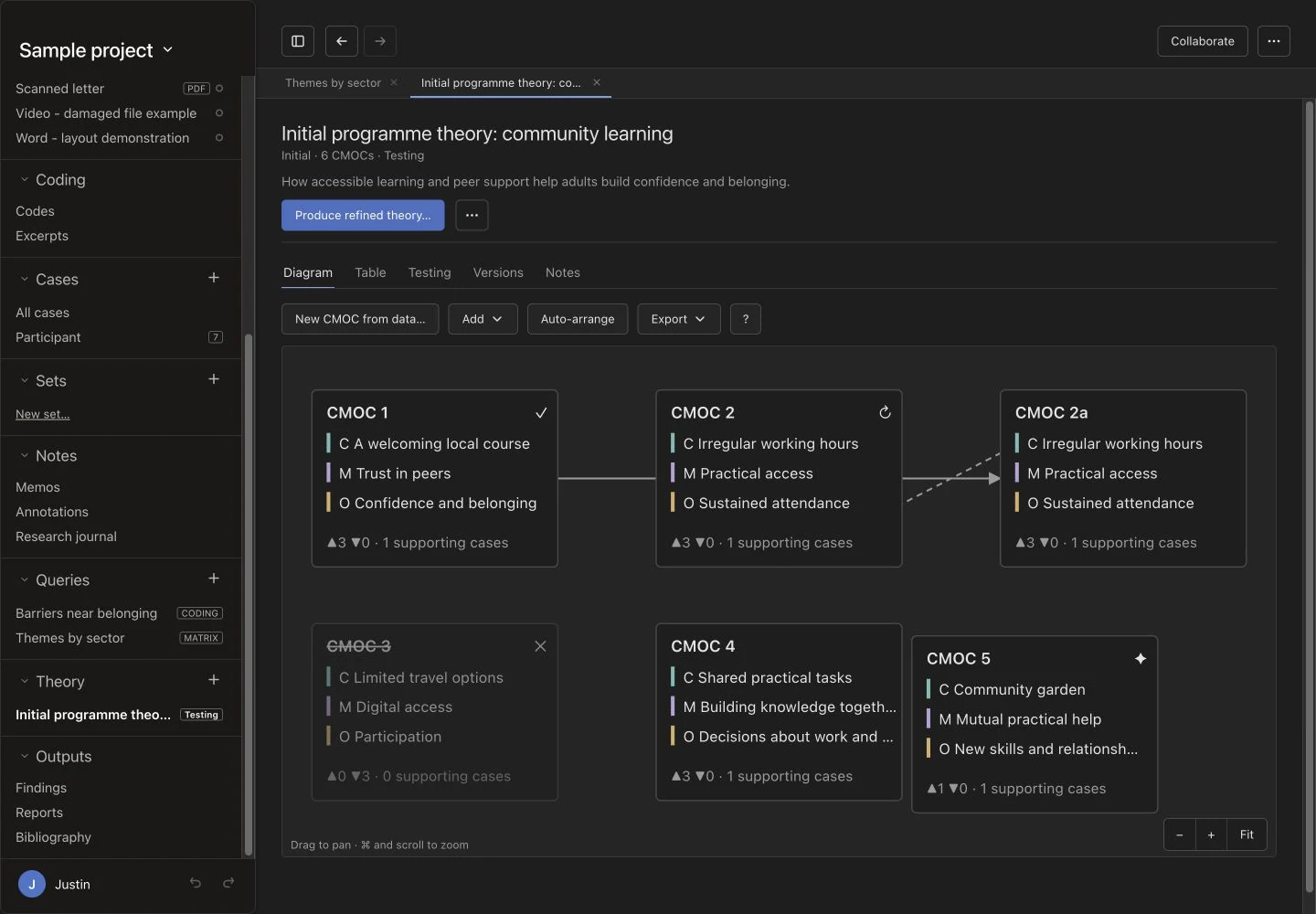
Add the intervention and the actor to every explanation, or split a mechanism into the resources offered and the reasoning they trigger.
Rate each source, then link passages, including from published PDFs, to the context, mechanism, outcome, or the whole CMOC.
Confirm, refine, refute or set aside each CMOC. Nothing is deleted, and lineage shows what became of every explanation.
Link the intervention, resources and reasoning in a CMOC to standard behaviour change technique and mechanism of action terms, to make theories comparable across studies. Your own wording stays as it is.
Local AI proposes up to three techniques or mechanisms for each part of a CMOC, with a definition and reason. Nothing is linked until you accept it.
Bring in an existing programme theory as your initial theory, then test and refine it against your own data.
Offer a code’s passages as first evidence for a CMOC, or add an explanation you find in the data, with each passage’s stance set as you go.
04 · Qualitative evidence synthesis
Link reports to studies, agree a review protocol, extract and appraise each study beside its report, reconcile reviewers, then carry each study’s contribution into your findings. Switch it on alongside realist tools, or on its own.
A study with several papers counts once, and a paper describing several studies links to each. Create studies from your sources in one step, and import screening outcomes.
Shared templates keep reviewers comparable. Every field saves as you type and keeps its exact supporting quotations. Optional local AI proposals wait for your acceptance.
Compare independent submissions side by side, agree every matching value at once, and resolve the differences with a note.
Record methodological limitations with your rationale. Oriel calculates no quality score, and AI never appraises.
A quotation added to a finding records that study’s contribution and its codes. Scope queries and matrices by study, and check a finding without one study.
Write your CERQual judgements, flagged for review when the evidence changes, then export review tables and a Summary of Qualitative Findings to Word or Excel.
Oriel imports screening outcomes but does not run searches, deduplicate records, or draw flow diagrams.
05 · Work together
There is no Oriel server to set up and no new account to approve. Choose a folder in the cloud or network storage your team already uses, and Oriel keeps everyone’s copy of the project in step through it, with each person’s work attributed to them.
Click Collaborate, enter your coder name, and choose an empty folder in your cloud or network drive. You can also share a project as you create it.
Give named colleagues access through OneDrive, Teams, Dropbox, or your provider, exactly as you would for any other folder.
Each person chooses Join a shared project and saves their own copy outside the folder. New members start from a recent snapshot, so joining stays quick.
Your working project stays on your own computer. Oriel adds only small, fixed change files to the shared folder, so your provider never has to synchronise a database while someone has it open.
Coding happens on your local copy. Oriel sends your changes after a short pause in your work, at most about a minute later, and catches up after time offline. Arrival then depends on your provider.
Each copy codes under its own coder name, and Undo only undoes your own changes. Compare colleagues with percentage agreement and Cohen’s kappa, or code blind.
Two people coding the same passage both keep their coding. Edits to different parts of a memo are both kept, and Conflicts can put back a value someone replaced.
Colleagues on Macs and Windows PCs can share one project. Oriel explains how to keep a cloud folder fully downloaded, and how to reach a Teams channel through the OneDrive app.
Teams with an administrator can run a self-hosted service that shares coding without source text, code names, memos, or attributes. Turn it on in Settings → Advanced.
Who can see what: a shared folder holds the whole project, including recordings, transcripts, and deleted text in the history. Oriel adds no encryption of its own and cannot remove a person, so share with named people through a provider your institution and ethics approval allow, and remove access there when someone leaves. Cross-platform sharing has been tested through iCloud Drive and local network folders; OneDrive, Dropbox, and other providers are not yet confirmed.
06 · The real thing
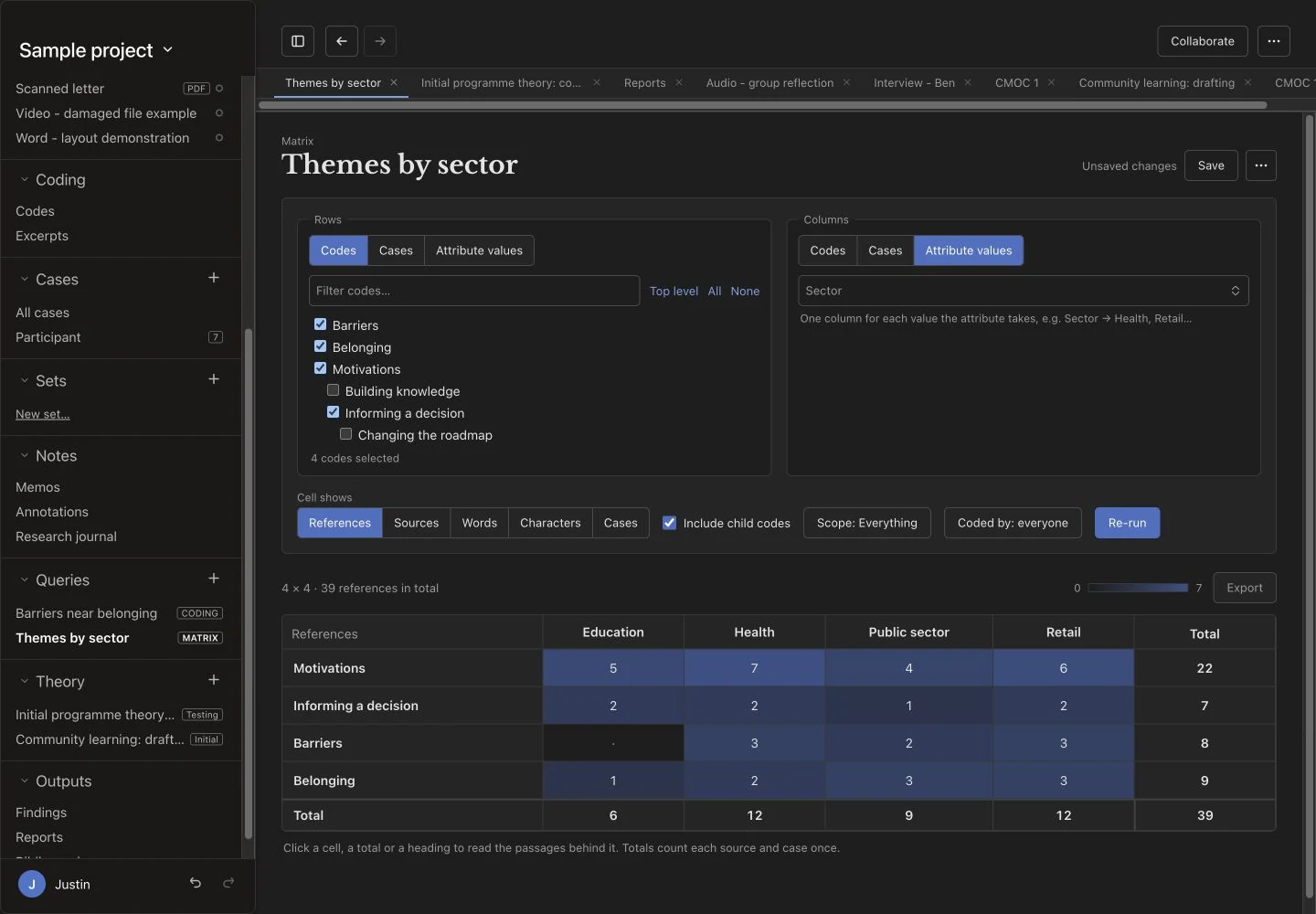
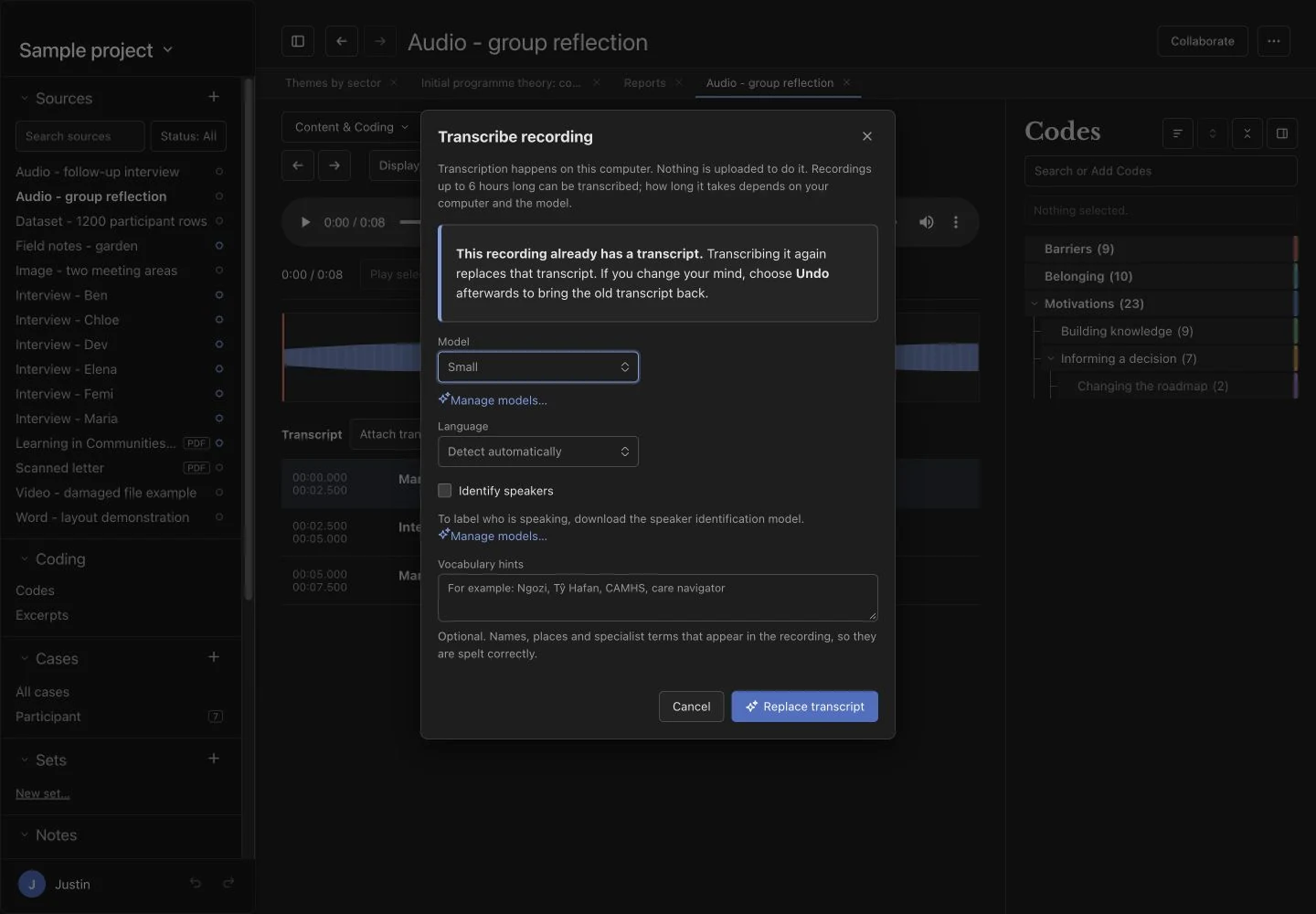
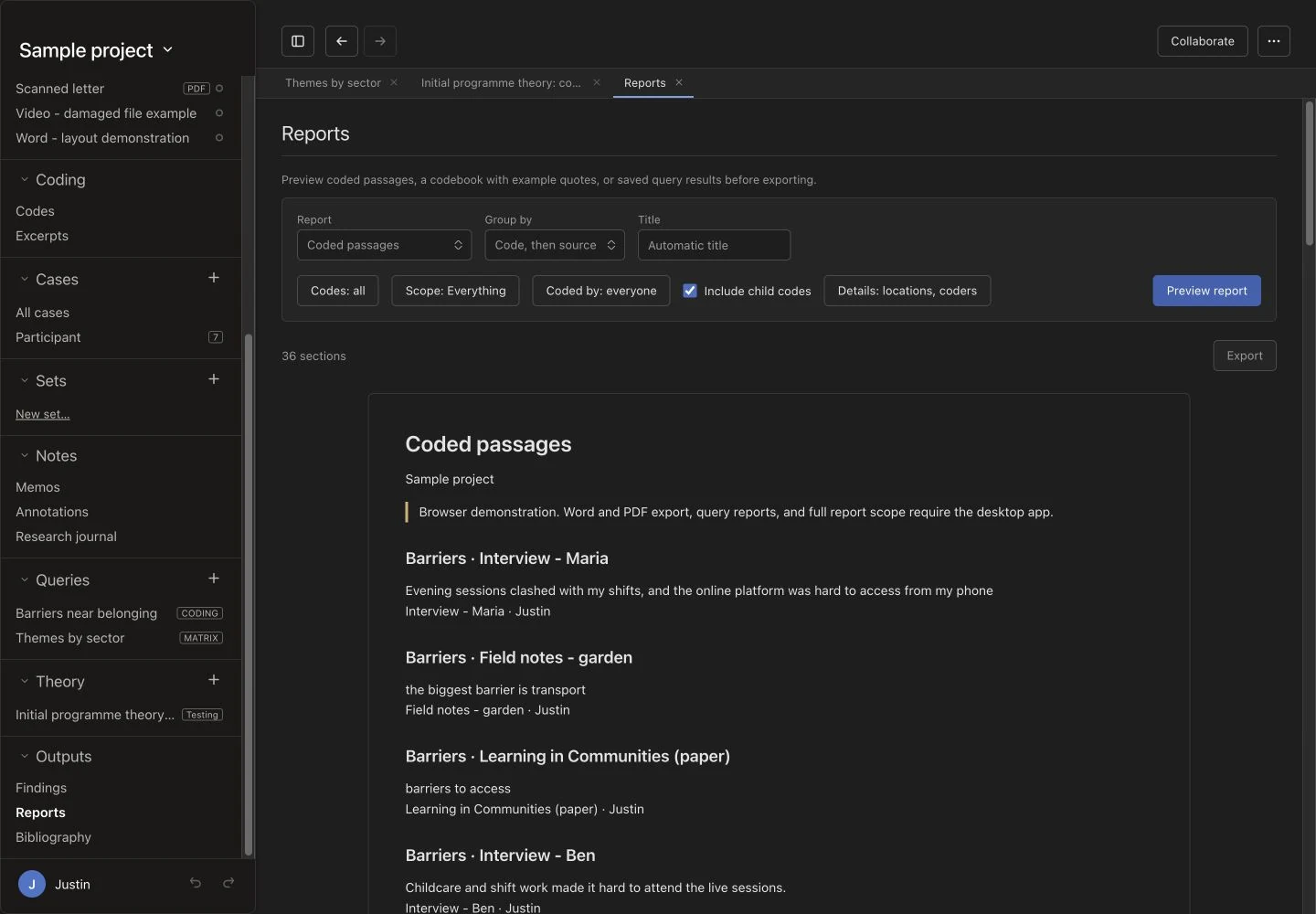
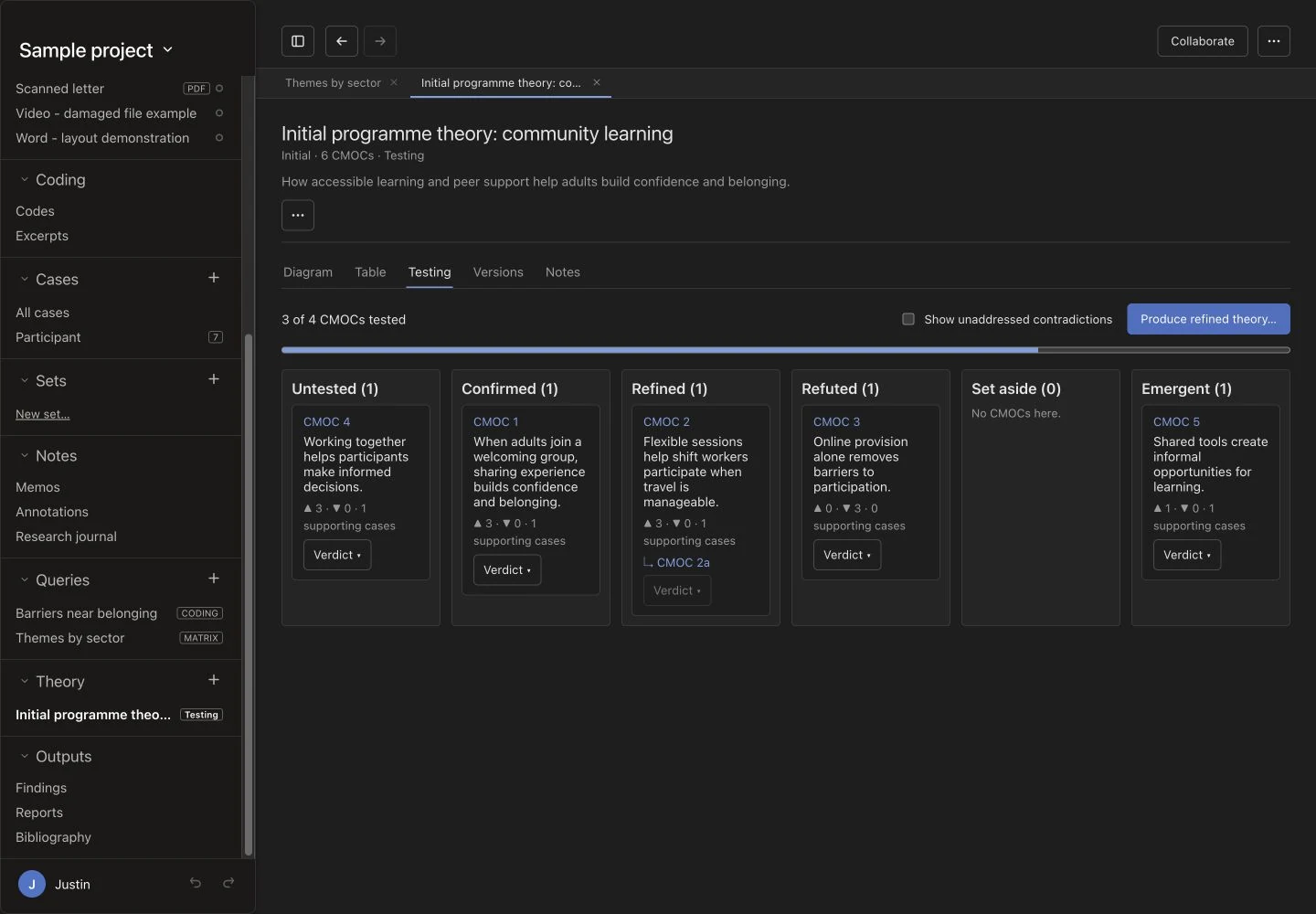
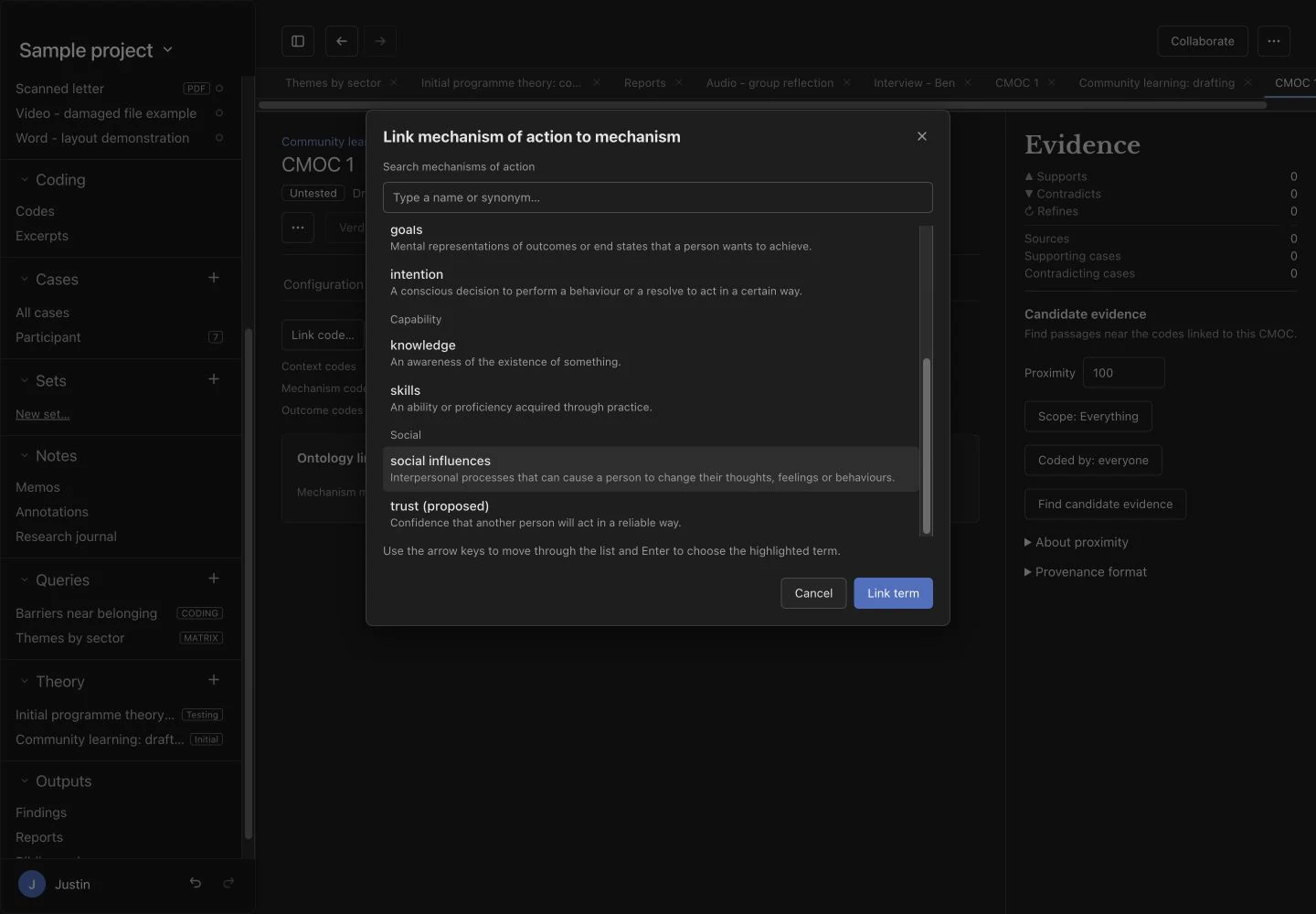
Captured on 19 October 2026 using the browser demonstration and fictional sample data. Desktop-only processing and exports are described in the feature guide. Select a screenshot to see it full size.
07 · Frequently asked questions
Practical answers about your data, optional AI, and working with Oriel.
Your working project is saved as a file on your computer. Coding, queries, reports, transcription, and optional AI processing run locally. If you choose collaboration or a cloud-synchronised folder, that folder or service also copies project material according to its access and storage arrangements.
Oriel’s optional AI runs on your computer after downloading a model. Your research material is not sent to a cloud AI service for processing.
No. You can code and analyse your material yourself. In the default suggestion mode, you review suggestions before accepting them. A separate, optional AI-coder mode saves a run directly under its own identity.
Yes. The trade-off for keeping AI processing on your computer is that it requires powerful hardware. Performance depends on your processor, available memory, graphics hardware, and chosen model. Less powerful computers may run models slowly or be unable to run larger ones. AI is optional, so you can use Oriel’s manual coding and analysis tools without it.
Yes. You can choose a separate AI coder for a run, inspect its coding, compare it with yours, and remove the run. The default mode gives you suggestions to accept or dismiss instead. Both approaches need your critical judgement.
Local processing helps you control where your material is processed. Before importing sensitive data, check your institution’s requirements, study approvals, and storage arrangements. A locally stored project may still be synchronised by services such as OneDrive.
Coding and analysis run locally. Download any transcription or AI models beforehand. Retrieving references from DOIs and capturing online sources require internet access.
Oriel imports NVivo .nvp and .nvpx projects, with a companion .qdpx export and/or codebook needed to restore names. Some information, including attribute values, memo text, and saved searches, does not transfer. It also supports REFI-QDA exchange and Word or PDF reports. Read transfer warnings and check the result; export back to NVivo is not fully supported.
Yes, through the storage you already use. Choose a folder in OneDrive, Teams or SharePoint, Dropbox, Google Drive, iCloud Drive, or a network drive, then share that folder with named colleagues as usual. Each person keeps a separate local copy outside the folder, works at full speed, including offline, and codes under their own name. There is no Oriel server or account. Everyone with access to the folder can read the whole project. See how it works or read the current limits.
It is designed to be. Your project is a single file on your computer, so opening sources, coding, and searching do not wait on a server. Text search uses an index, long PDFs draw only the pages near you, and large datasets scroll without loading every row at once. Coding is saved as you apply it, and ⌘K (Ctrl+K on Windows) opens any source, code, or command by name. Local AI and transcription speeds depend on your hardware.
Yes. Choose Qualitative evidence synthesis when you create a project, or switch it on later. You can manage studies and their reports, share extraction and appraisal templates, reconcile two reviewers, link study contributions to findings, and record CERQual judgements. Oriel imports screening outcomes but does not run searches, deduplicate records, or draw flow diagrams, and shared project files do not technically blind reviewers. See the review workflow.
No. It supports general qualitative coding, matrices, and reporting, with additional tools for programme theory, CMOCs, behavioural science, and qualitative evidence synthesis.
Oriel is intended to be updated and improved over time. You are welcome to report bugs and request features. Justin develops Oriel as a passion project alongside his main work, so personalised support, response times, and fixes or requested features cannot be guaranteed.
Yes. AI was used to help develop the application. This means that the code upon which the programme was built was written with the assistance of AI. This is separate from Oriel’s optional AI analysis features, and does not mean your research data is shared with the AI tools used during development.
Have another question? Ask Justin about Oriel.
Who’s building it
Oriel is designed by Justin Aunger, a realist methodologist at the University of Birmingham, for the kind of work described on the methods page: realist evaluations and syntheses where coding, evidence and theory testing need to stay connected.
Free · Windows first
Coming October 2026.
Oriel will be free to download, starting with Windows. Register your interest to hear the moment it’s released, ask a question, or talk about using it in your research.
Register interest